
The average manufacturing facility loses 30 hours of production per month to downtime. That adds up to 360 hours a year, according to L2L's 2025 manufacturing downtime report. The majority of those hours come from stoppages that were never on anyone's schedule.
For a maintenance manager at a 150-person factory, the daily version of that report looks familiar. A conveyor belt seizes up because nobody tracked when the last inspection happened. A technician starts a scheduled service and discovers the replacement filter isn't in stock.
These problems don't happen because teams don't care about preventive maintenance. They happen because:
- Schedules live in spreadsheets that nobody checks once the week gets busy
- Checklists sit on clipboards that get filled in from memory at the end of a shift
- Technicians spend most of their time on emergency repairs, not planned work
This guide covers how to build a preventive maintenance programme, measure whether it's reducing downtime, get technicians to follow it, and keep it running long term.
What a Preventive Maintenance Program Actually Looks Like
Most factories already do some preventive maintenance. They change oil on machines, replace belts, and rely on a supervisor's mental list to keep things moving.
But that is not a program. A preventive maintenance program is a structured system where every task has a named owner, every completed job leaves a documented record, and the results are measured over time.
The cost difference is significant. Reactive maintenance costs three to five times more than preventive maintenance. That includes emergency labour, rushed parts orders, lost production, and the delays that spread across the rest of the schedule when one machine goes down.
A structured preventive maintenance program shifts your spending from unplanned repairs to scheduled work that prevents those repairs from happening. The goal is not to eliminate breakdowns entirely. Equipment will still fail. But those failures become the exception rather than the daily reality.
Why Most Preventive Maintenance Programs Fail at Manufacturing Facilities
Most preventive maintenance programs fail because the infrastructure to support them isn't there. These are the most common reasons.
Trying to Cover Every Asset at Once
A factory with 200 machines can't build schedules for all of them in the first week. Teams that try get overwhelmed and abandon the effort before seeing any results.
No Asset Criticality Ranking
Not every machinery has the same impact on production. A packaging line that stops your entire output is not the same as a backup compressor. Without ranking assets by criticality, teams spend equal time on equipment that carries very different levels of risk.
Schedules That Live in Spreadsheets
Spreadsheets can hold a maintenance schedule. But they can't assign tasks, send reminders, or confirm that work was completed. The schedule only stays current if someone opens the file and updates it manually. When that person calls in sick or goes on leave, nobody picks up where they left off. The schedule goes stale, and tasks start slipping.
Technician Resistance to New Workflows
If your preventive maintenance program adds paperwork without making anyone's job easier, technicians won't follow it. This happens most often when the system requires a desktop login or manual data entry at the end of a shift.
Spare Parts That Aren't Aligned With the Schedule
A technician arrives to perform a scheduled task and the replacement part isn't in stock. The job gets deferred. After a few rounds of this, the team stops trusting the schedule.
No Visible Results
If leadership and technicians can't see fewer breakdowns, lower costs, or less overtime, motivation drops. Without tracking, preventive maintenance looks like extra work with no return.
How to Build Your Preventive Maintenance Program in 30 Days
You don't need six months or a consulting firm. A manufacturing facility can launch a working program in 30 days by starting small and building from there:
Week 1 - Audit Your Assets and Rank Them by Criticality
Start with a complete list of every asset that needs maintenance. Include production equipment, utilities like compressors and HVAC systems, and support equipment like conveyors and forklifts.
For each asset, answer three questions:
- What happens to production if this machine goes down?
- How often has it broken down in the past 12 months?
- How long does it typically take to repair?
Use those answers to sort assets into three tiers:
- Tier 1: Assets that stop production when they fail
- Tier 2: Assets that reduce capacity or quality
- Tier 3: Assets that are inconvenient but don't affect output
Your programme starts with Tier 1. If your maintenance team already knows which five machines cause the most problems, start there. A formal criticality analysis can come later.
You can use this asset criticality assessment template to get started.
Week 2 - Define Tasks and Frequencies for Your Top-Priority Machines
For each Tier 1 asset, define what preventive maintenance involves. Pull recommended intervals from OEM manuals. Talk to your senior technicians about what they've learned through experience. Look at breakdown history to find patterns.
For example, a typical task list for a CNC machine might include:
- Lubrication every 500 hours
- Spindle inspection every 1,000 hours
- Coolant system flush every quarter
- Belt replacement once a year
Each task needs a frequency, an estimated duration, and a named assignee.
Be specific in your checklists. "Inspect belt tension" is vague. "Check belt tension — acceptable deflection: 10–15mm" gives technicians a clear pass or fail criterion and produces better data over time.
Week 3 - Set Up Your Scheduling System and Assign Ownership
This is where spreadsheet-based programmes fall apart. You need a system that creates tasks on schedule and assigns them to specific people. A CMMS does this automatically. If you're not ready for software, a shared digital calendar with notifications is a minimum starting point, but it won't scale.
Assign every task to a named technician. Shared ownership means no ownership. Each person should see their upcoming work for the week, understand what's expected, and have access to the checklist and any required documentation.
Set up a weekly review. A 15-minute check-in where the maintenance manager reviews completed versus overdue tasks keeps the programme visible and holds the team accountable.
Week 4 - Launch With One Production Line and Iterate
Don't roll out across the entire factory at once. Pick one production line, ideally the one with the most Tier 1 assets, and run the program there for at least two weeks before expanding.
Use this pilot period to find friction points. Are preventive maintenance checklists too long? Are frequencies realistic? Are technicians struggling with the tools? Adjust based on real feedback, not assumptions.
Once the pilot line runs smoothly, expand to the next one. This phased approach builds confidence within the team. It also gives you documented proof that the program is reducing breakdowns, which helps when you need leadership buy-in for the next phase.
Getting Technicians to Follow the Programme
A preventive maintenance programme is only as strong as the people running it. If technicians see it as extra paperwork that doesn't help them, compliance drops within weeks.
Involve Technicians in Checklist Design
The people doing the work know which steps matter and which ones are redundant. When technicians help build the checklists, they're more likely to follow them. It also reduces the back-and-forth that comes from handing someone a checklist that doesn't match what the job actually involves.
Use Tools That Work on the Floor
A system that requires a desktop login is not practical for technicians who spend their shifts between machines. Mobile access with offline capability removes the biggest barrier to real-time data entry. If the tool works on their phone and doesn't need a Wi-Fi connection, they're far more likely to use it.
Start With the Most Problematic Equipment
Don't launch the program on the easiest assets. Start with the machines that break down most often and generate the most emergency callouts. When technicians see fewer late-night phone calls because a scheduled service caught the problem early, they become advocates for the programme on their own.
Share the Results With the Team
Show the team what the programme is achieving each month. How many scheduled tasks were completed on time. How many breakdowns happened compared to the previous month. How much overtime went down. Technicians respond to evidence that their work is making a measurable difference.
Investigate Before You Escalate
If a technician consistently misses scheduled tasks, the problem is usually capacity, not motivation. They may have too many reactive jobs pulling them away from planned work. Look at the workload before treating it as a performance issue.
How to Measure Preventive Maintenance Program Success
A program without metrics is invisible to leadership. If you can't show that it's working, the budget and support will eventually disappear. These are the five KPIs worth tracking:
- Preventive Maintenance Compliance Rate: The percentage of scheduled tasks completed on time. Aim for 90% or higher. If you're consistently below 80%, the schedule is either unrealistic or the team doesn't have enough capacity.
- Mean Time Between Failures (MTBF): How long assets run between breakdowns. A rising MTBF on your Tier 1 equipment is the strongest indicator that the programme is doing what it's supposed to do.
- Mean Time to Repair (MTTR): How long it takes to fix equipment when it does break down. This number often improves after a programme is in place because technicians become more familiar with the assets they maintain on a regular basis.
- Planned vs Unplanned Work Order Ratio: The percentage of all work orders that are planned maintenance versus reactive. A healthy programme targets 70 to 80% planned work. If most of your work orders are still unplanned, the programme hasn't shifted the balance yet.
- Spare Parts Availability at Scheduled Maintenance Time: The percentage of scheduled tasks that go ahead without delay because the required parts were in stock. This catches inventory alignment issues early, before they cause deferrals across the schedule.
Present these monthly to leadership in a one-page format. Where possible, tie each metric to a financial outcome. For example, a 10% improvement in MTBF on a production line that generates £50,000 per day in output translates directly to avoided losses.
How Makula Helps Manufacturing Teams Run a Preventive Maintenance Program
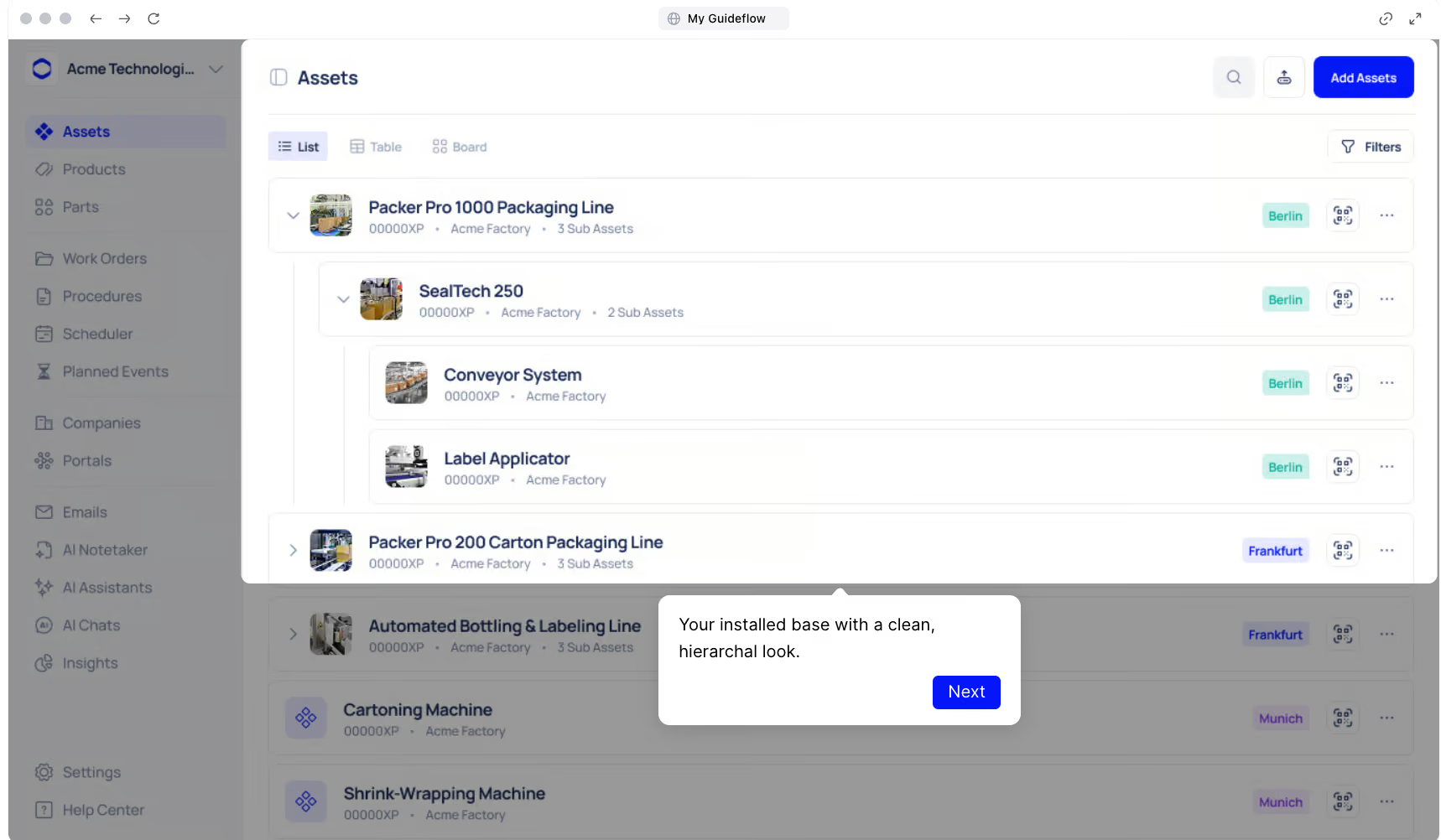
Makula is a CMMS built for manufacturers that need to manage preventive maintenance, work orders, and asset records in one system. It combines automated scheduling, digital inspections, and AI-powered documentation access without requiring expensive IoT setups or months of implementation.
Here's how Makula helps maintenance teams move from spreadsheets and paper checklists to a structured preventive maintenance program:
Mobile Work Orders for Real-Time Shop Floor Visibility
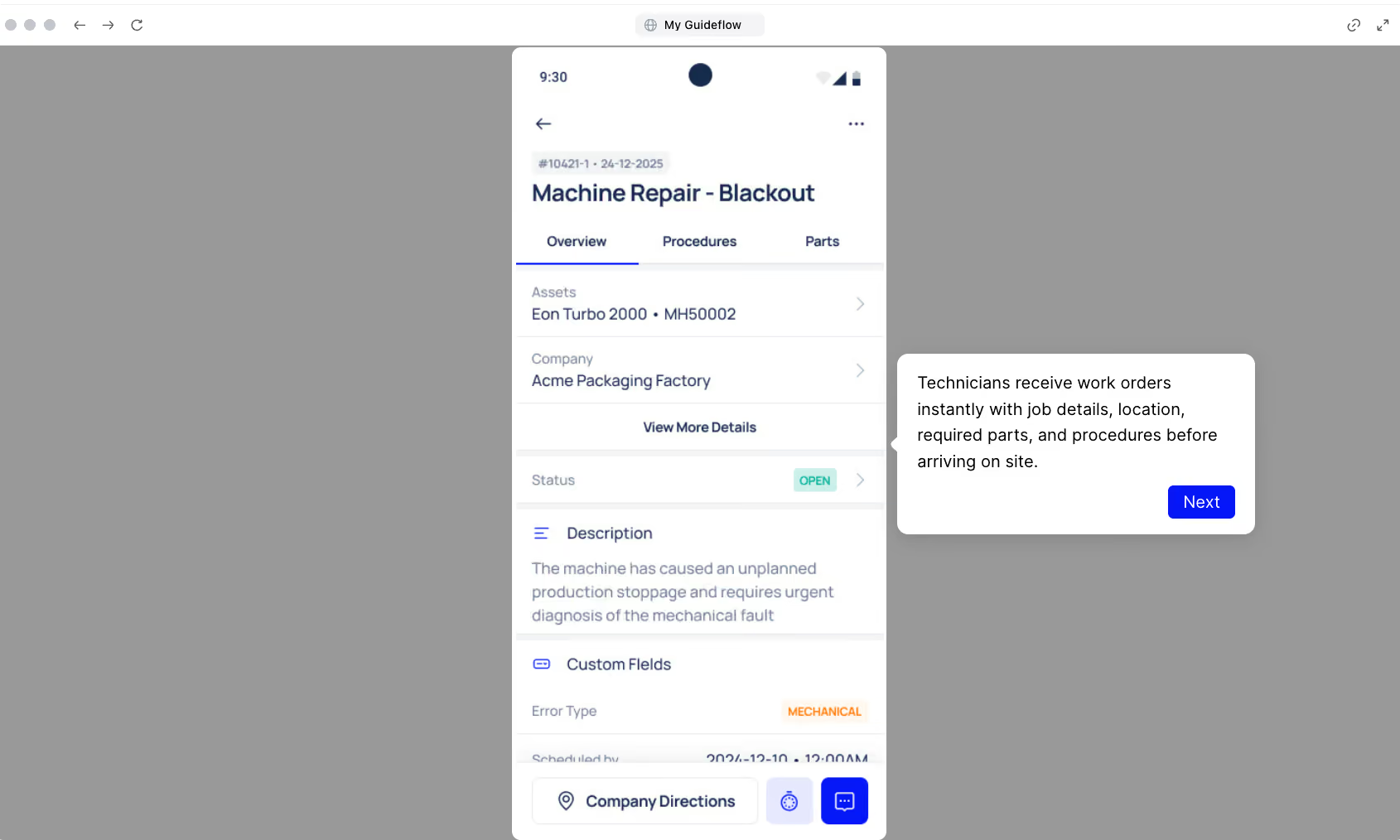
Makula's work order system runs on mobile devices, giving technicians full access from the shop floor, even when offline. Every work order follows the job from start to finish:
- Create, assign, and track tasks from any device
- Move jobs through Kanban stages: Scheduled, In Progress, Completed
- Link every work order back to the asset for a complete maintenance history
- Attach notes, photos, and time logs directly to the job
- Give managers real-time visibility into open, overdue, and completed work
Technicians spend less time on admin and more time on the equipment that needs attention.
Digital Inspection Checklists That Close Compliance Gaps
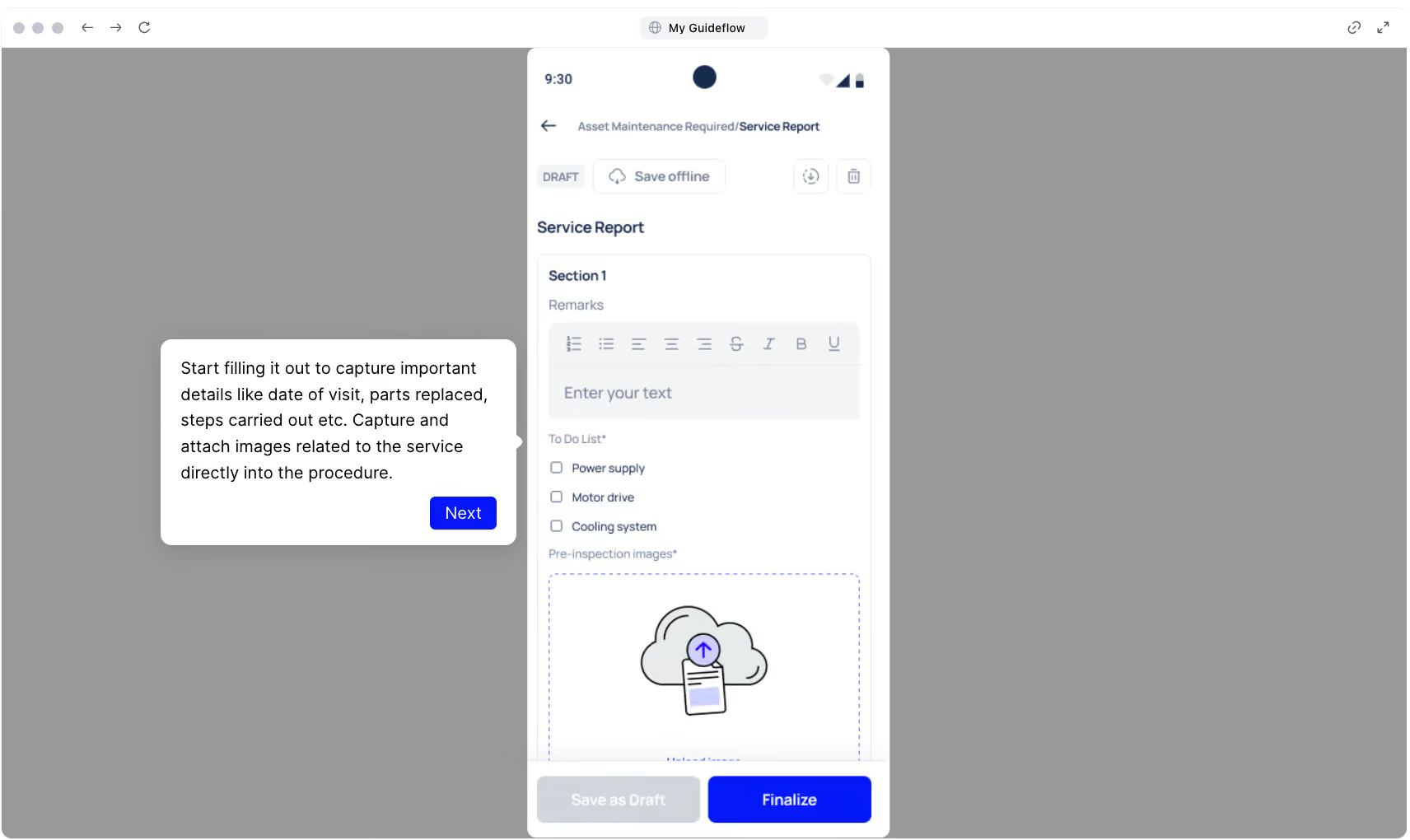
Paper inspection forms get lost, skipped, or filled in from memory at the end of a shift. Managers can't verify whether inspections were actually completed or just ticked off.
Makula's digital inspection forms guide technicians step by step through each task, with mandatory fields that prevent skipping. Every completed checklist becomes a verified, traceable record that ties back to the asset:
- Photo attachments, logged readings, and digital sign-offs from any device
- Timestamped entries linked to the specific asset
- Automatic sync when connectivity returns
- Supervisor notifications for follow-up and compliance review
The more specific your checklist steps are, the better your data gets. Instead of "check belt tension," a step like "check belt tension, acceptable deflection: 10–15mm" helps technicians make faster decisions and gives you more useful trends over time.
QR Code Scanning for Instant Asset History on the Floor
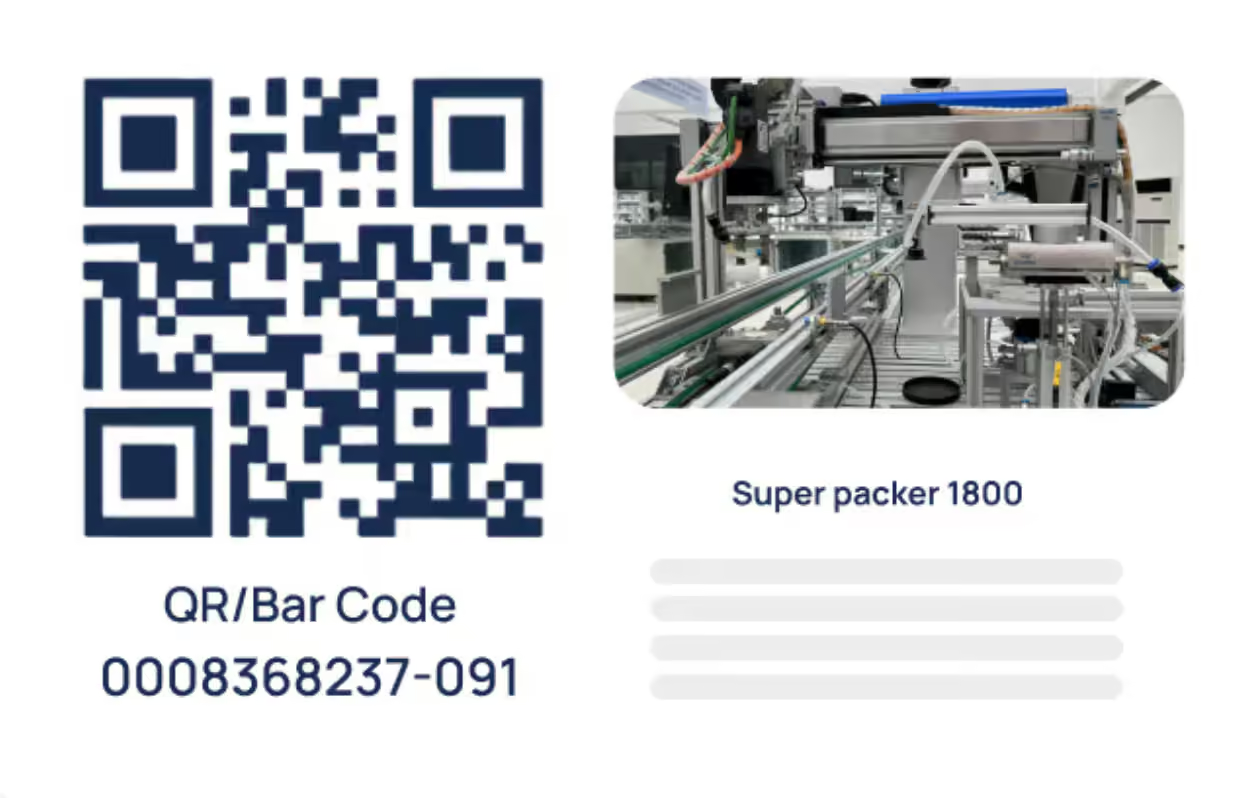
Makula's QR code scanning lets technicians scan a tag on any machine and pull up everything they need before starting the job. The feature gives technicians immediate access to:
- Full asset profile including maintenance history and open work orders
- Works on any smartphone camera with no dedicated hardware
- Direct links to active checklists and attached documentation.
Offline-Ready Mobile Access That Works Across the Entire Plant
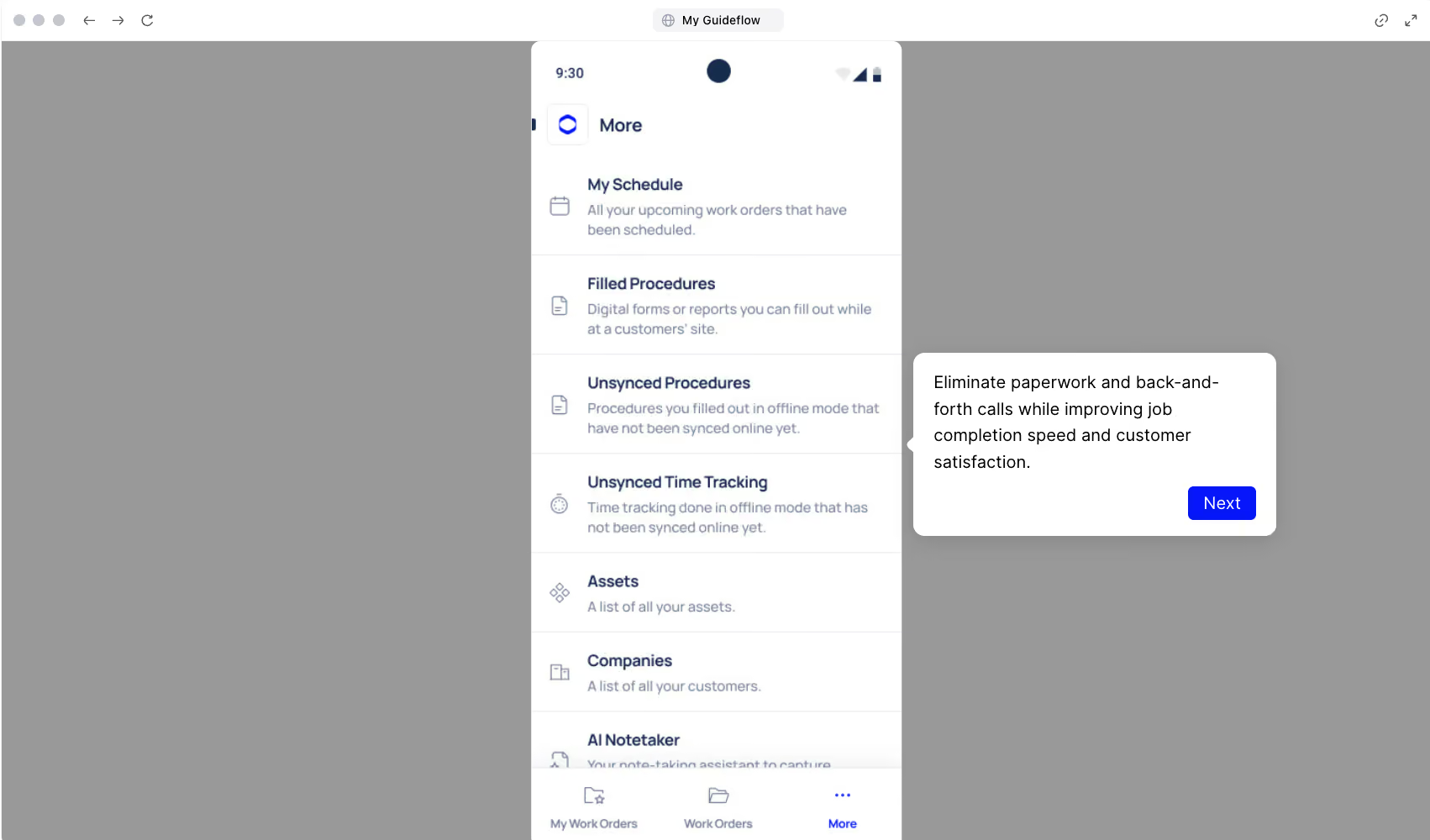
Factory floors have connectivity dead zones. A CMMS that needs a stable internet connection forces technicians to defer data entry or revert to paper. Both undermine programme consistency.
Makula is built mobile-first with offline access. Technicians complete checklists, update work orders, and log inspections regardless of connectivity. Makula's mobile app supports:
- Full functionality on iOS and Android devices
- Offline completion of work orders, checklists, and inspections
- Automatic background sync when the connection returns.
.AI Copilot for Instant Answers From Equipment Documentation
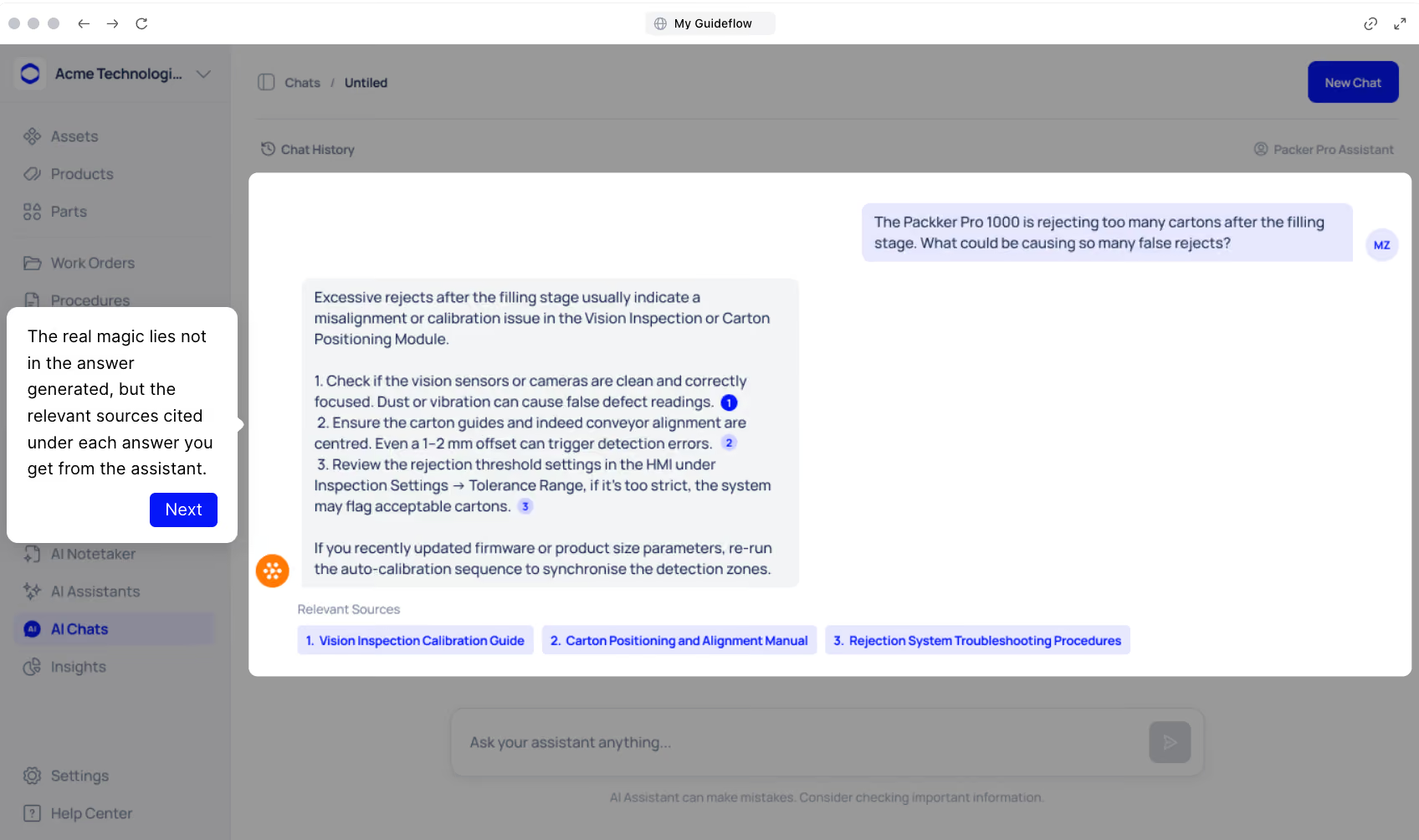
New technicians spend time calling colleagues or searching through filing cabinets when they encounter unfamiliar equipment. That slows down repairs and creates a dependency on senior staff.
Makula's AI Copilot pulls cited answers directly from equipment manuals, service histories, and troubleshooting guides. Instead of flipping through a binder or waiting for a callback, technicians type a question and get the sourced answer in seconds.
Makula's AI Copilot offers:
- Cited answers pulled from uploaded documents, not AI-generated content
- Click any source to preview the original document
- Highlighted sections showing exactly where the answer came from
- Multi-language support for diverse maintenance teams
- Reduced dependency on veteran technicians for routine knowledge
For example, a technician servicing a hydraulic press for the first time can ask "what's the recommended fluid viscosity for Model X at 40°C?" and get the exact specification from the OEM manual, with a link to the source page.
Spare Parts Reorder Planning That Prevents Preventive Maintenance Deferrals
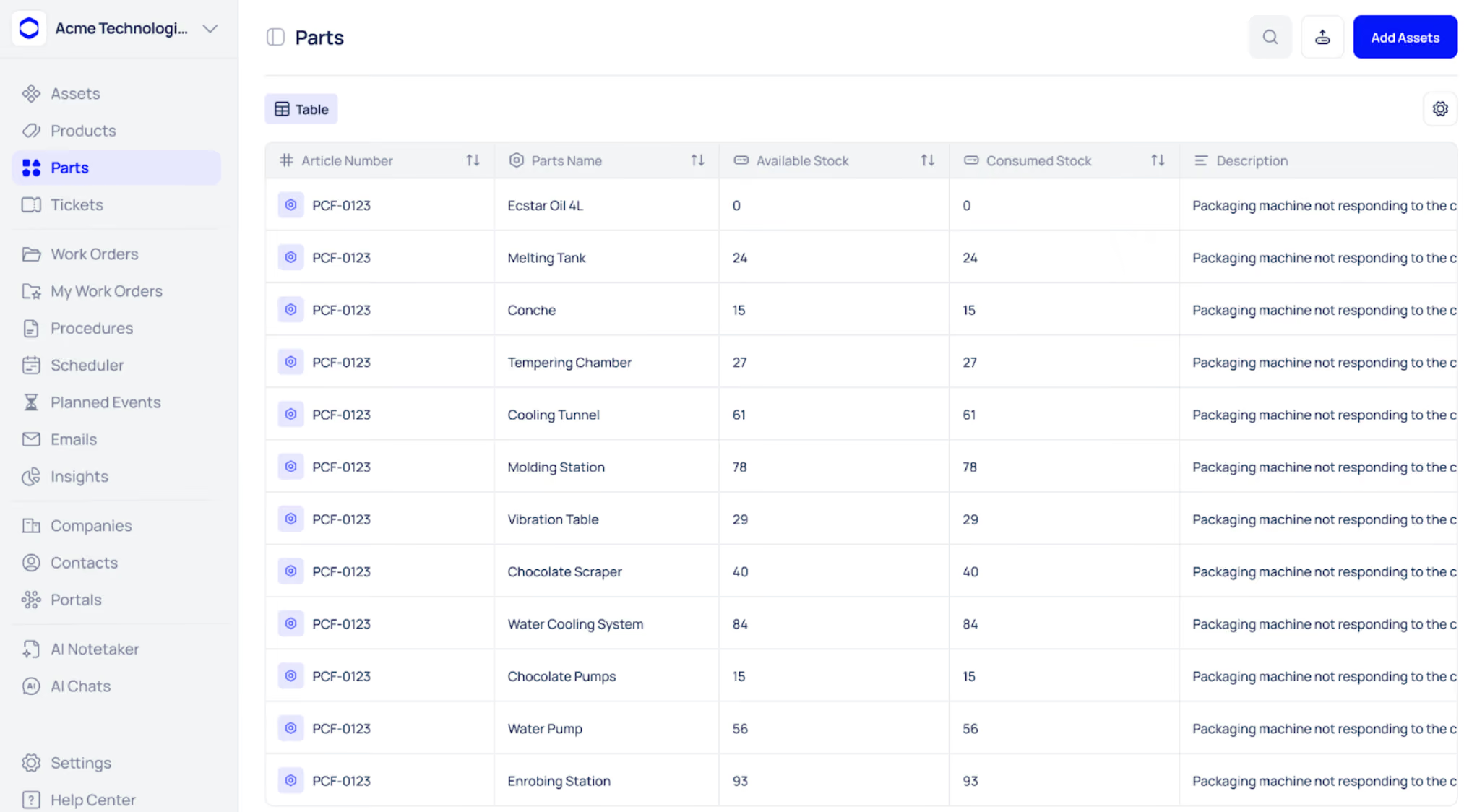
A scheduled maintenance task means nothing if the replacement part isn't in stock. Stockouts turn planned work into deferred work, and deferred work turns into breakdowns.
Makula's parts and inventory module tracks consumption, automates low-stock alerts, and links parts directly to assets. The module helps maintenance teams stay ahead of inventory gaps with:
- Automatic stock updates when technicians log parts usage
- Low-stock alerts that trigger before you run out
- Each part linked to the assets that use it
- Inventory tracking across multiple storage locations
- Full consumption history for smarter reorder planning
Over time, consumption data shows you exactly which parts each machine uses most. That makes budgeting predictable and removes the guesswork from reorder decisions.
Book a demo to see how Makula helps your team build a preventive maintenance program that technicians actually follow.





