Mobile App

Manage Maintenance from Anywhere

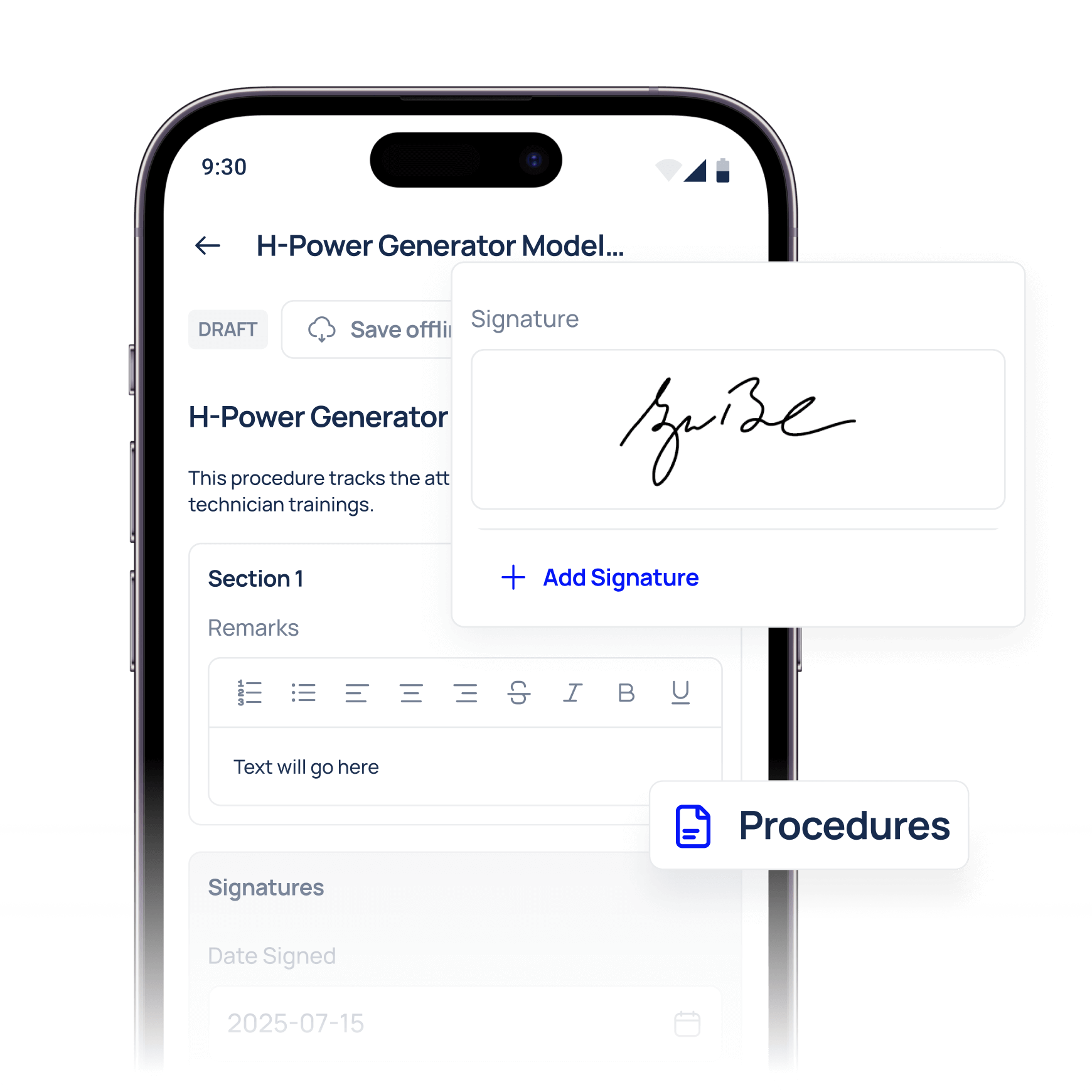
Empower your technicians with the Makula CMMS mobile app. Create and update work orders, track maintenance history, and access equipment manuals—all from your phone or tablet. Stay connected to your operations in real time, reduce downtime, and keep your maintenance teams in sync wherever they are.
Industry leaders we work with
Stay Compliant

Automatically meet industry regulations, safety standards, and audit requirements — with traceable records for every machine.

Reduce Downtime

Prevent unplanned stops and save up to €500K per year with automated maintenance scheduling and faster service resolution.

Increase Productivity

Give your team mobile access to work orders, documentation, and procedures — so they get more done with less admin.

Industrial AI

Execute work orders directly on site

Technicians can receive, work on, and close maintenance tasks directly from their mobile devices, eliminating delays caused by desk work or paper-based processes, all via a fast mobile CMMS experience.
View assigned work orders with priorities, due dates, and instructions
Start, pause, and complete jobs while standing at the asset
Reduce administrative overhead by documenting work once, on-site
Receive and manage tasks instantly through the Makula CMMS app
Industrial AI

Access full asset context instantly

Give technicians immediate access to asset information so troubleshooting and decision-making happen faster and with fewer interruptions, right in your CMMS mobile view.
View asset details, location, and criticality on mobile
Access full maintenance history and previous fixes from the app
Open manuals, SOPs, and documentation without leaving the task
See spare parts, alerts, and warranty info inside the cmms mobile app
Industrial AI

Capture accurate maintenance data while working

Ensure maintenance data is captured at the moment work is performed so reports are complete, reliable, and audit-ready, using the Makula CMMS mobile maintenance app.
Attach photos, notes, measurements, and findings directly to tasks
Fill out checklists and inspection forms during execution on mobile
Log time and observations without relying on memory later
Capture signatures and audit evidence in the mobile maintenance workflow
Industrial AI

Reduce delays and miscommunication

Real-time updates from the mobile app keep technicians, planners, and managers aligned without phone calls or manual handovers, supported by CMMS mobile apps that sync instantly.
Instant status updates when work starts or finishes
Push notifications for new or updated assignments
Clear visibility into who is working on what and when
Real-time sync across mobile apps and the web CMMS
Industrial AI

Track Time Where the Work Happens

Capture maintenance effort directly in the mobile app, accurate, simple, and fully connected to your work orders and mobile CMMS software.
Start and stop time tracking directly from maintenance tasks
Automatically link hours to assets, jobs, and maintenance activities
Get reliable time data for workload analysis and planning
Export labour and time reports to your CMMS dashboard
Industrial AI

Support safety, quality, and compliance on the job

Embed safety checks, quality standards, and required documentation directly into mobile workflows to ensure consistent execution with the Makula cmms mobile tools.
Mandatory steps, checklists, and confirmations are built into tasks.
Photo evidence, timestamps, and technician sign-offs for audits.
Automatically generated audit trails for inspections and work.
Embed permit-to-work and SOP links directly in mobile tasks.

Features of our mobile app

Work Orders

Create, assign, and complete tasks. Log downtime and repairs in real time. Add photos, comments, and voice notes

Checklists & Inspections

Standardize procedures for recurring tasks. Ensure safety and compliance. Use dynamic checklists with conditional logic

Asset Maintenance History

View full maintenance logs for every machine. Know what’s been done – and what’s due next. Identify recurring issues quickly

Documentation Access

View manuals, SOPs, diagrams, and more. Attach files to assets or tasks. Access everything offline with auto-sync

QR Code Scanning

Instantly pull up asset data in the field. Save time and eliminate guesswork

Frequently asked questions

What is the Makula CMMS mobile app used for?
The Makula CMMS mobile app allows technicians to execute maintenance work directly on site using their mobile devices. It supports work orders, assets, checklists, and documentation without relying on paper or desktops.
Can technicians complete work orders on mobile devices?
Yes, technicians can view, update, and close work orders directly from the Makula mobile app. All updates sync with Makula CMMS in real time or once connectivity is restored.
Does the mobile app work offline?

 Yes, the Makula CMMS mobile app supports offline mode for work orders, checklists, and data capture. Data automatically syncs once the device reconnects to the network to ensure no field entries are lost.
Can technicians scan QR codes on assets with the mobile app?
Yes, the Makula mobile app supports QR code scanning to quickly open assets, locations, or tasks. This reduces search time and ensures technicians open the correct asset record in the CMMS app.
What kind of data can technicians capture on mobile?
Technicians can capture photos, notes, measurements, checklist responses, and time entries directly in the mobile maintenance app. This ensures accurate, audit-ready maintenance records linked to work orders and assets.
Is the mobile app easy to use for non-technical users?
Yes, the mobile app is designed specifically for technicians and frontline workers. Its intuitive interface minimises training and increases adoption across sites using Makula mobile CMMS software.
How does the mobile app help reduce downtime?
By giving technicians immediate access to tasks, asset information, and history in the Makula mobile app, the mobile experience reduces delays and troubleshooting time so teams fix issues faster.
Does the mobile app support inspections and checklists?
Yes, technicians can complete digital inspections and checklists directly in the Makula mobile app. Results are automatically stored and linked to assets and work orders for audit and follow-up.
Is the mobile app secure?
Yes, the mobile app follows the same role-based access controls and permissions as Makula CMMS Software. Users only see the data they are authorised to access, and all entries are recorded in the CMMS audit trail.
Is the mobile app included in Makula CMMS Software?
The mobile app is included as part of Makula CMMS Software and is available as the native mobile CMMS interface for frontline teams.

Here’s what our customers say about us

Since implementing Makula in June 2023, we've seen a dramatic reduction in errors and a significant boost to our after-sales efficiency. Makula has streamlined our processes, allowing us to provide faster and more accurate service to our customers. This has not only improved customer satisfaction but has also generated additional revenue through monthly sales.

Robert Thornton
Sales Director

The efficiency and clarity that Makula brought to our after-sales operation is unparalleled. Our team is more aligned, our customers are happier, and our revenue is on the rise. Highly recommended!

Norbert Kaiser
Managing Director

The overview of all the latest offers, spare part orders, invoices, and service reports, helps the customer enormously. The software has really developed very well and Makula is doing a great job. The service is great, if I need something, there is always an answer from Karina very quickly.

Michael G.
Chief Executive Officer

We have had a great experience with the Makula team from the sales process to onboarding and then helping with day to day support if needed. The team are always quick to come back to us and provide solutions to requests. The platform is easy to access and navigate and Makula have already incorporated most of the functionality we need. This enables us to support our customers with the tools and resources they need to order spares, access machine information or book service visits.


Lizzie W.
Marketing Executive

The software is very user-friendly and intuitive to use. The team assists very intensively with the transformation process and onboarding. We have managed to integrate the tool into our daily processes, thereby promoting our internal coordination and ultimately our spare parts sales.

Flynn S.
Advisory Board Member

Thanks to the implementation of Makula, we have achieved full traceability of all customer requests. We consolidated all after-sales interactions into a single platform, which has significantly improved our response times and operational efficiency

Fernando Neves
Global Customer Support Manager

Since we started using Makula, we've gained a broader perspective on the evolving world of digital after-sales. The software has seamlessly blended with our processes, enhancing operations and providing fresh insights. It's a gentle reminder of the portential avenues open for SME machine suppliers in this digital era.

Erik Döinghaus
Managing Director

Makula's platform has been a game-changer for us. Onboarding was incredibly smooth, and the system's ease of use has significantly improved our after-sales service efficiency. Our technicians now save several hours each day by reducing the time spent on phone calls and searching through scattered documents.

Edward Herbert
COO & Founder

Being a user of 30+ machine brands, I can firmly state that Makula's after-sales platform is transformative. It doesn't just enhance and streamline communication with OEMs—it revolutionises it, driving unparalleled customer satisfaction in an increasingly complex and dynamic production

Christopher Staub
Chief Executive Officer

Ready to transform your machine maintenance?