
A single unplanned breakdown costs a fleet operation between $448 and $760 per day in lost revenue, emergency repairs, and idle drivers. Multiply that across a fleet of 50 vehicles with just 5 downtime events each per year, and you're looking at over half a million dollars in preventable losses.
Yet many fleet teams still track maintenance on spreadsheets, whiteboards, or a mix of disconnected tools that weren't built for the job.
Service intervals slip. Inspection records live in filing cabinets. And when a vehicle breaks down, no one can say when it was last serviced or which parts were replaced.
Fleet maintenance software solves this by centralising vehicle data, preventive maintenance schedules, work orders, and parts inventory in one system. The right platform helps teams move from reactive repairs to planned maintenance, cutting downtime and extending the life of every asset in the fleet.
This article reviews the best fleet maintenance software for 2026. We cover features, pricing, and what each platform does best so you can find the right fit for your operation.
What to Look for in Fleet Maintenance Software
Not all fleet maintenance platforms are built the same. Some focus heavily on GPS tracking and treat maintenance as an afterthought. Others offer deep maintenance workflows but lack mobile access for technicians in the field.
Before comparing platforms, here are the features that matter most:
Preventive Maintenance Scheduling
Preventive maintenance is the single most effective way to reduce unplanned breakdowns. Look for platforms that support both calendar-based triggers (every 30 days, every quarter) and condition-based triggers (mileage thresholds, engine hours, sensor readings).
The best systems automatically create work orders, assign the right technician, and attach the required parts and procedures when a threshold is met.
Work Order Management
Your fleet maintenance software should let you create, assign, track, and close work orders from anywhere. Look for features like priority tagging, visual task tracking through Kanban boards or calendar views, and the ability to attach photos, notes, and parts lists to each work order.
Automated routing is a plus. When a defect is flagged during an inspection, the system should be able to generate a work order and send it to the right team without manual intervention.
Mobile Access
Technicians and drivers aren't at desks. They're in workshops, under vehicles, or on the road. If the software doesn't work on their phone, it won't get used.
Look for native mobile apps (iOS and Android) that let teams log inspections, update work orders, check parts availability, and scan QR codes from the field. Offline mode is essential for areas with poor connectivity. Data should sync automatically once the device is back online.
Parts and Inventory Tracking
Missing parts cause the longest delays in fleet repairs. A brake pad that's out of stock can turn a two-hour job into a two-day wait.
The right platform tracks stock levels in real time, sends automatic low-stock alerts, and links parts directly to work orders so you can see exactly which components were used on which vehicle. This reduces emergency purchases and keeps repairs moving.
Integrations
Your fleet maintenance software doesn't work in isolation. It needs to connect with telematics providers, ERP systems, fuel cards, and accounting tools to avoid data silos.
Check for pre-built integrations with the tools you already use, and ask about API access if you need custom connections. The fewer manual data transfers your team has to do, the more reliable your records will be.
Reporting and Analytics
You can't fix what you can't measure. Look for dashboards that track cost per vehicle, mean time to repair (MTTR), mean time between failures (MTBF), and downtime trends.
The best platforms let you filter reports by vehicle, location, technician, or time period. This helps you answer questions like which vehicles cost the most to maintain, where compliance is slipping, and when it makes more sense to replace an asset than keep repairing it.
Compliance and Inspections
Compliance isn't optional. Digital inspection checklists, Driver vehicle inspection report (DVIR) workflows, and audit-ready records help your fleet stay compliant.
Look for platforms that support guided inspection forms with photo attachments, digital signatures, and conditional logic. When a defect is flagged, the system should automatically trigger a follow-up work order so nothing gets missed between the inspection and the repair.
AI Capabilities
Newer platforms are introducing AI-powered features that go beyond basic scheduling. These include AI copilots that provide instant troubleshooting guidance from maintenance history and manuals, voice-powered documentation for hands-free field reporting, and predictive diagnostics that flag issues before they cause breakdowns.
AI also helps with knowledge retention. When experienced technicians leave, their diagnostic insights can stay in the system and remain accessible to every team member. This is a growing differentiator and worth evaluating if your fleet operation depends on institutional expertise.
Best Fleet Maintenance Software at a Glance
8 Best Fleet Maintenance Software for 2026
Let’s review the top fleet maintenance software in detail:
Makula
Makula is a computerised maintenance management system (CMMS) built for fleet operators managing vehicles alongside industrial equipment. It helps teams manage preventive maintenance, work orders, and asset records in one system.
The software gives fleet and maintenance managers better visibility into vehicle health, service history, and maintenance costs than spreadsheets or disconnected tools. Makula also supports mixed-asset operations, so companies running trucks, heavy equipment, and production machinery can track everything from a single platform.
Makula's dashboards give maintenance teams quick access to downtime reports, cost-per-vehicle data, and upcoming service schedules.
Here's how Makula helps fleet teams optimise maintenance workflows and reduce downtime:
Work Orders That Keep Every Fleet Repair on Track
Fleet operations deal with several types of maintenance: mechanical, electrical, tyre, and scheduled services. When requests aren't routed correctly, jobs overlap, approvals get delayed, and vehicles stay off the road longer than necessary.
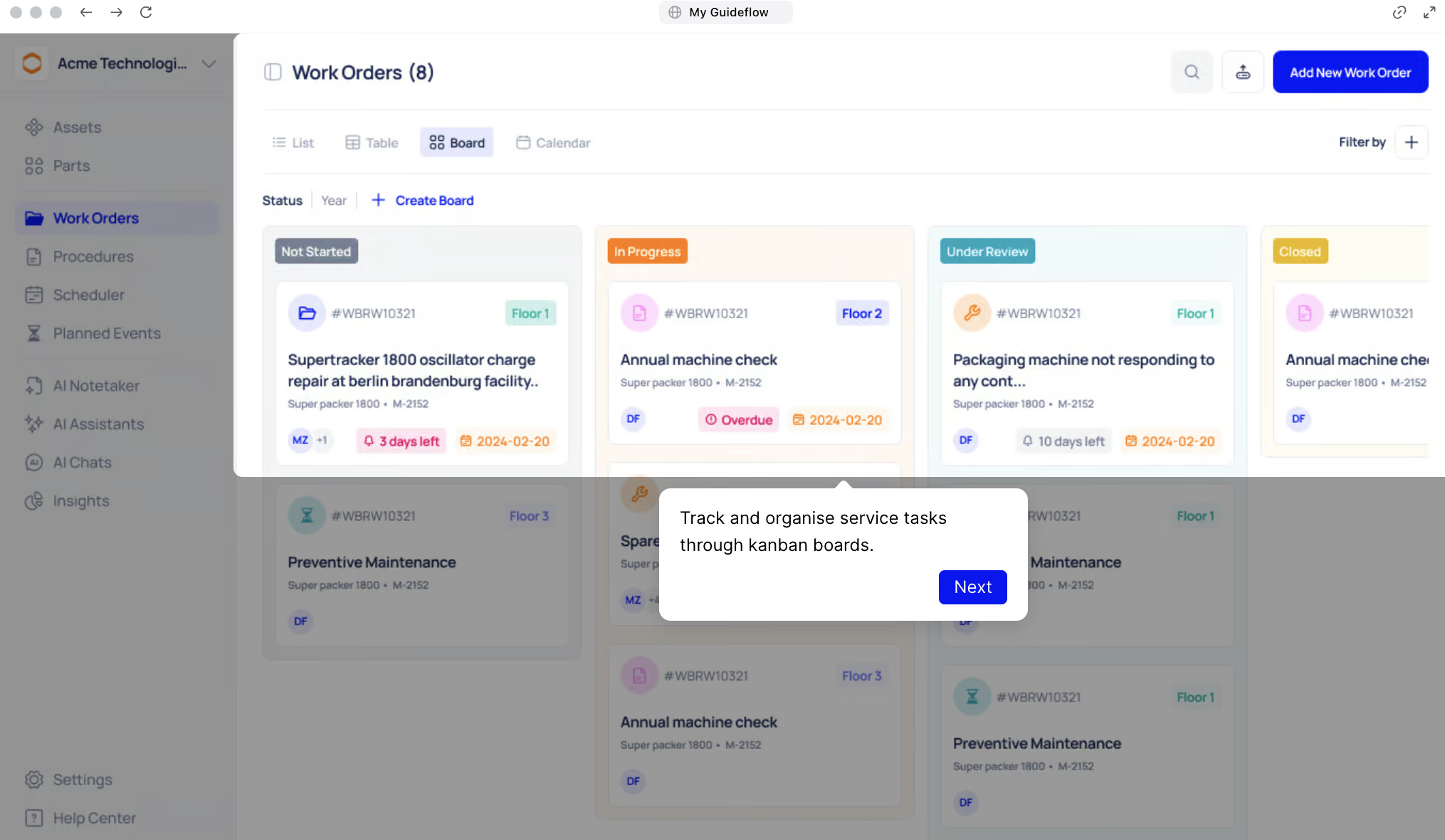
Makula's work order system helps organise and automate these workflows. Each task is routed to the right technician or team based on vehicle type, location, and priority. Teams can track every job through Kanban boards, moving tasks from Scheduled to In Progress to Completed with a clear visual of the full queue.
When you open a work order, the Overview tab gives a quick snapshot of all key details:
- Work Order ID: Unique identifier for each task
- Created Date: When the job was reported or generated
- Reporter: Who submitted the issue or request
- Assignee: The team or technician responsible for completing it
- Scheduled Date and Time: When the task is planned, also visible in the calendar view
For example, if a refrigerated van shows a compressor fault, a work order can be created automatically, routed to the right mechanic, and approved by the fleet manager. After the fix, all information is logged in one place for future reference.
Preventive Maintenance Scheduling That Stops Breakdowns
Unexpected vehicle breakdowns can halt deliveries, waste fuel, and disrupt operations. Most of the time, these issues happen because maintenance is reactive instead of planned.
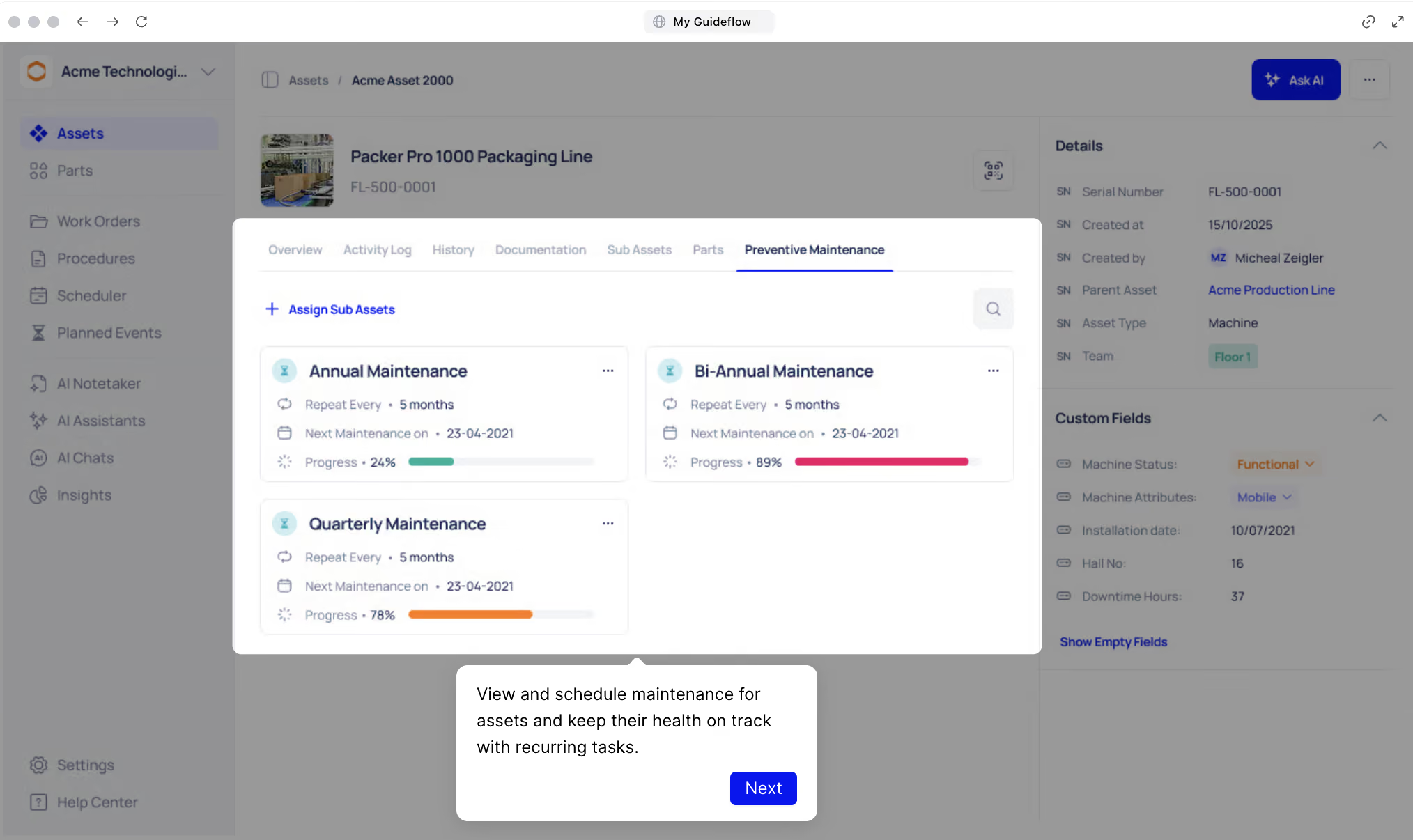
Makula helps prevent this with automated preventive maintenance scheduling. Teams can set up one-time or recurring maintenance for key fleet assets like engines, brakes, and HVAC systems. Each task is linked to the right vehicle, so nothing is overlooked.
The system supports both calendar-based triggers (every 30 days, every quarter) and condition-based triggers (mileage thresholds, engine hours, sensor readings). When a threshold is met, Makula automatically creates the work order, assigns the right technician, and attaches the required parts and procedures.
Here's how it helps with smart scheduling:
- Set repeat schedules by day, week, or mileage interval
- Add the right parts and procedures to each task
- Get automatic reminders before maintenance is due
- Keep every record time-stamped and stored under the correct asset
Asset Management for Full Fleet Visibility
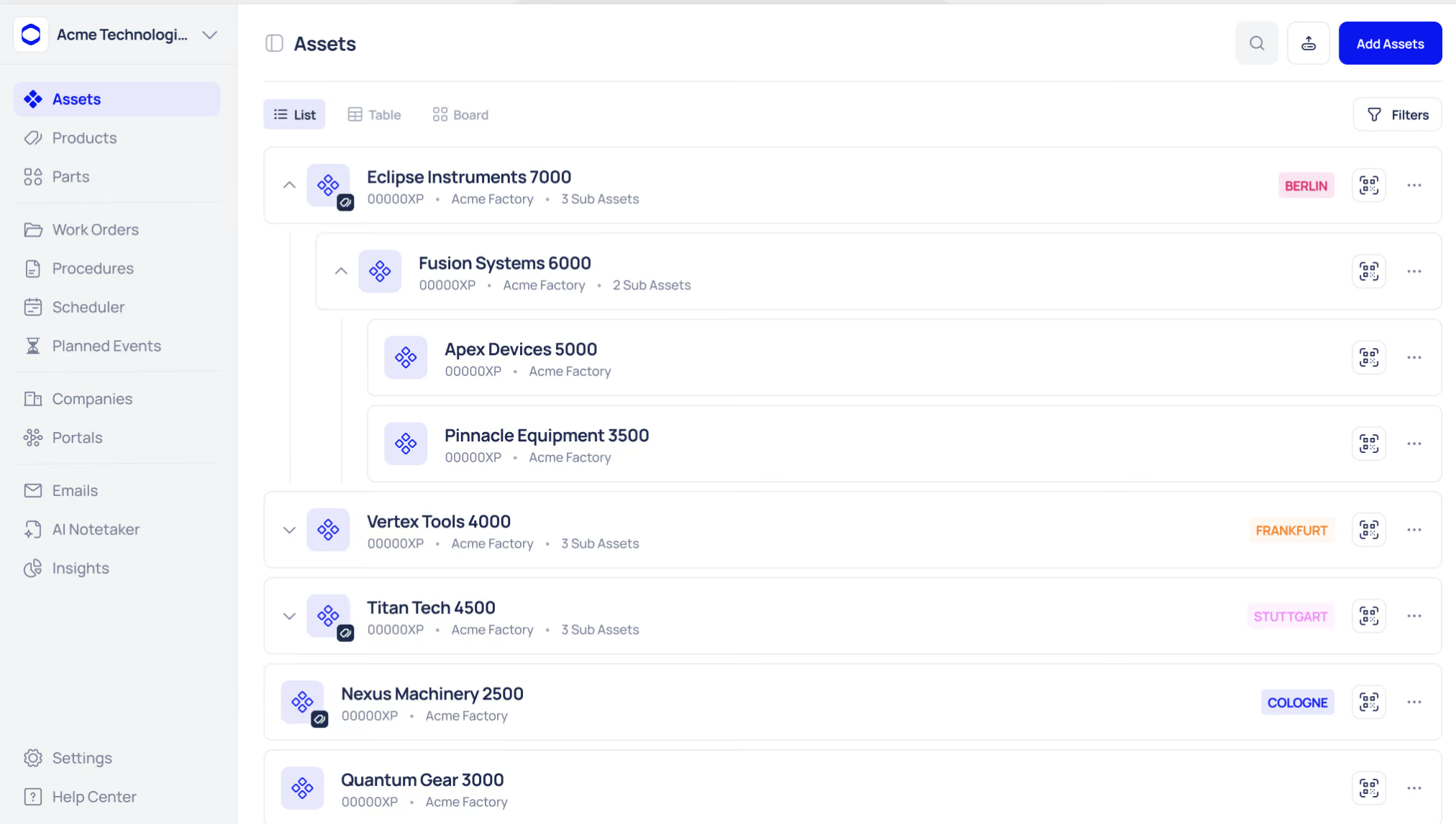
Fleet managers need to see what's happening across their vehicles and equipment at a glance. When asset data lives in different systems, it's hard to spot which vehicles need attention and which are ready for the road.
Makula's asset management gives teams a centralised view of every fleet asset in a full hierarchy, from fleet divisions down to individual components. Each vehicle is displayed with real-time status updates, and clicking on an asset shows:
- Equipment details and specifications
- Spare parts and inventory data
- Preventive maintenance schedules
- Inspection and calibration records
- Work order history and activity logs
- Manuals, notes, and photos
Technicians can scan a QR code on any vehicle or piece of equipment to pull up its complete profile instantly. No searching through folders or walking back to the office.
AI Maintenance Copilot To Give Technicians Instant Answers
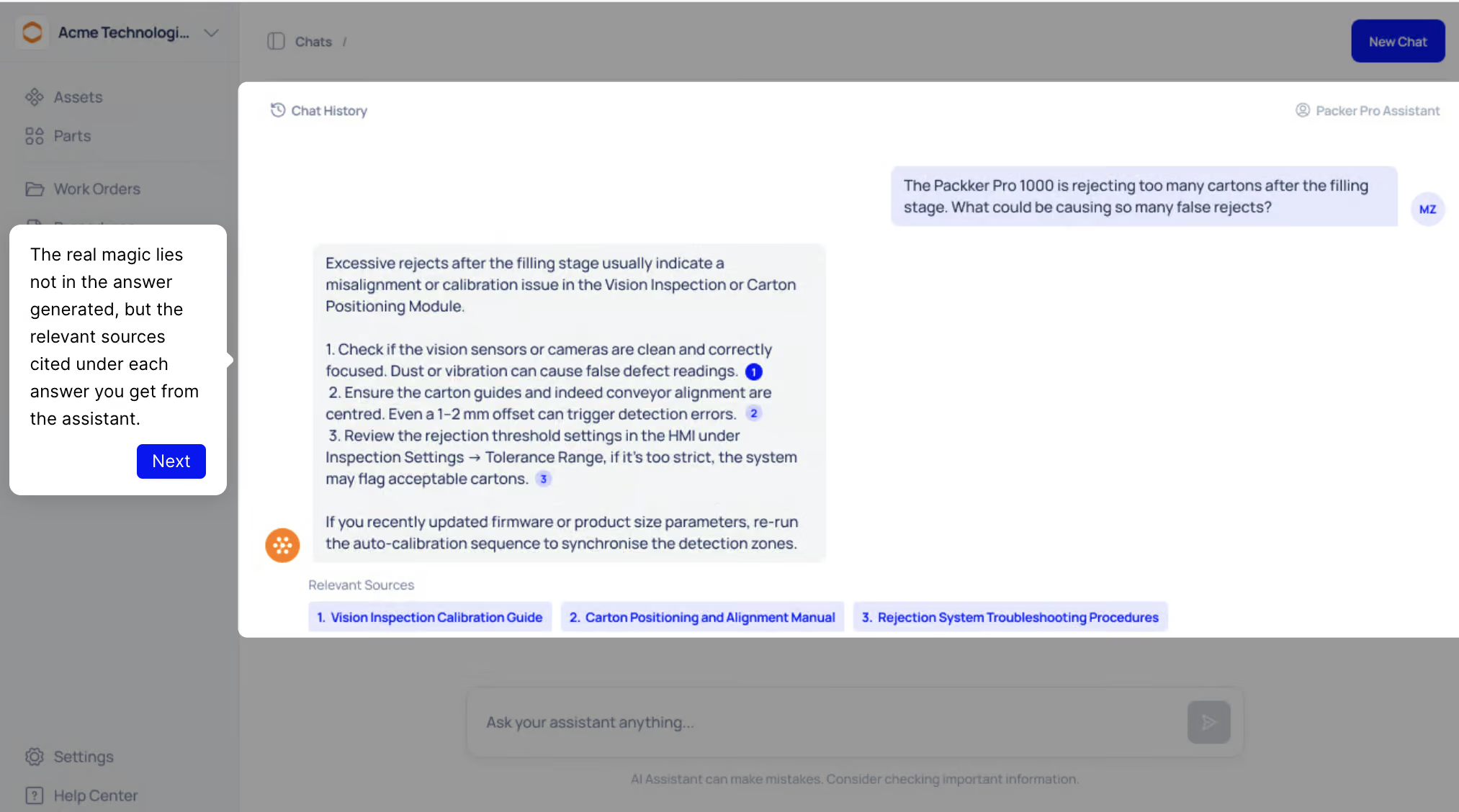
When a vehicle breaks down, technicians often waste time searching through manuals, calling colleagues, or guessing based on memory. The longer diagnosis takes, the longer the vehicle sits idle.
Makula's AI Maintenance Copilot solves this by pulling cited answers from equipment documentation, maintenance history, and shop-floor expertise. Technicians ask a question in plain language and get context-aware troubleshooting guidance on the spot.
The Copilot doesn't generate generic AI responses. It retrieves specific information from the data already stored in your system, including past repair logs, manufacturer manuals, and notes left by other technicians. This means answers are grounded in your fleet's actual history, not guesswork.
This also helps with knowledge retention. When experienced mechanics leave, their diagnostic insights stay in the system and remain accessible to every technician on the team.
AI Notetaker For Capturing Field Knowledge
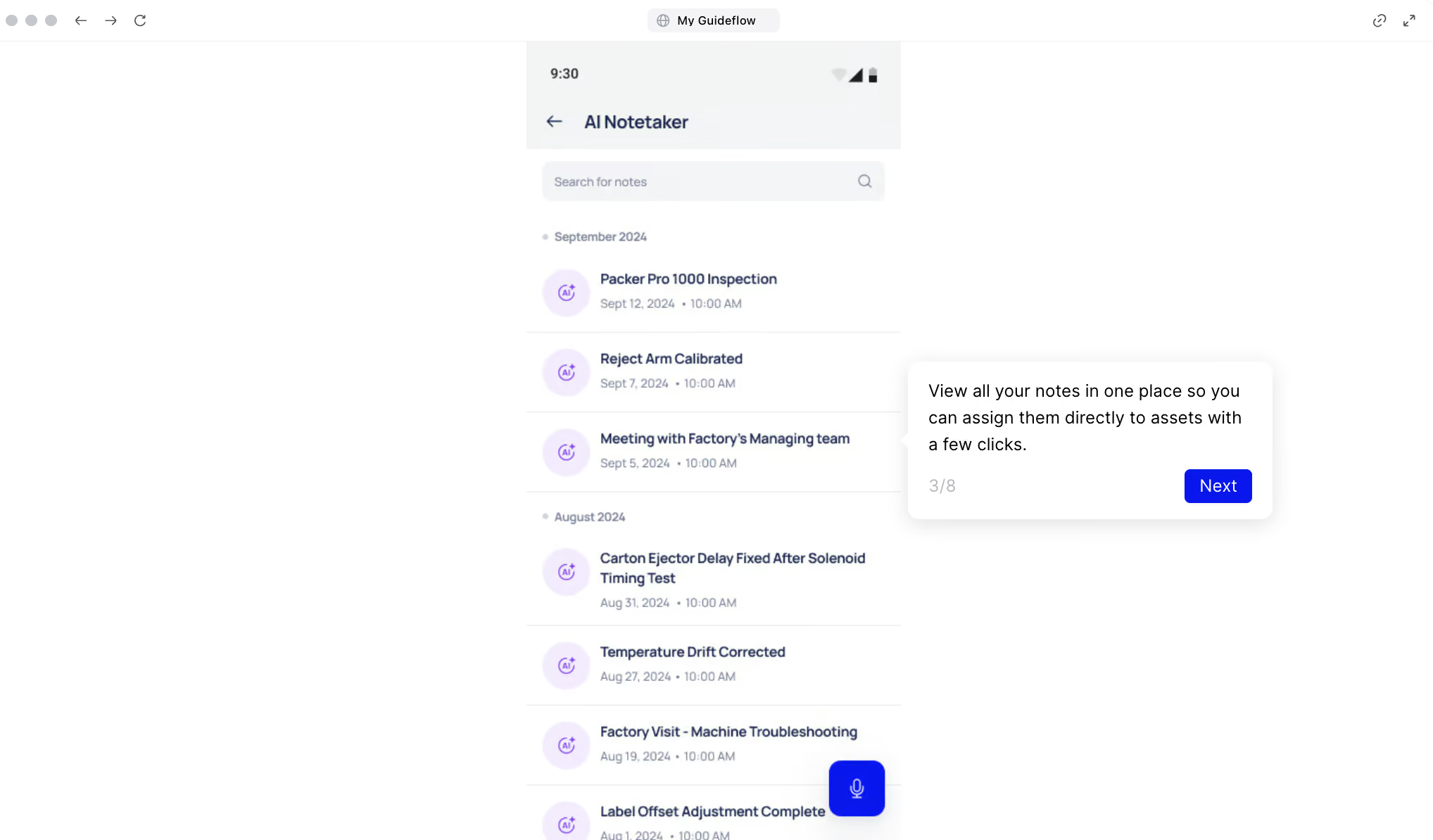
Technicians rarely have time to write detailed maintenance notes or update records during their shifts. When this information goes undocumented, valuable insights disappear, and recurring vehicle issues go unresolved.
Makula's AI Notetaker solves this with voice-powered documentation. Technicians can speak their notes during inspections or repairs, and the system automatically transcribes, summarises, and organises the information.
Every note is saved under the correct asset's history, so supervisors and future technicians can find it easily. The Notetaker also feeds new insights back into the AI Copilot's knowledge base, so the system gets smarter over time.
For example, after replacing a fuel injector on a delivery truck, a technician can record a quick voice update. The AI Notetaker converts it into a structured report, saves it under the vehicle's history, and makes it easy for the team to review later.
Mobile Access That Keeps Fleet Teams Connected
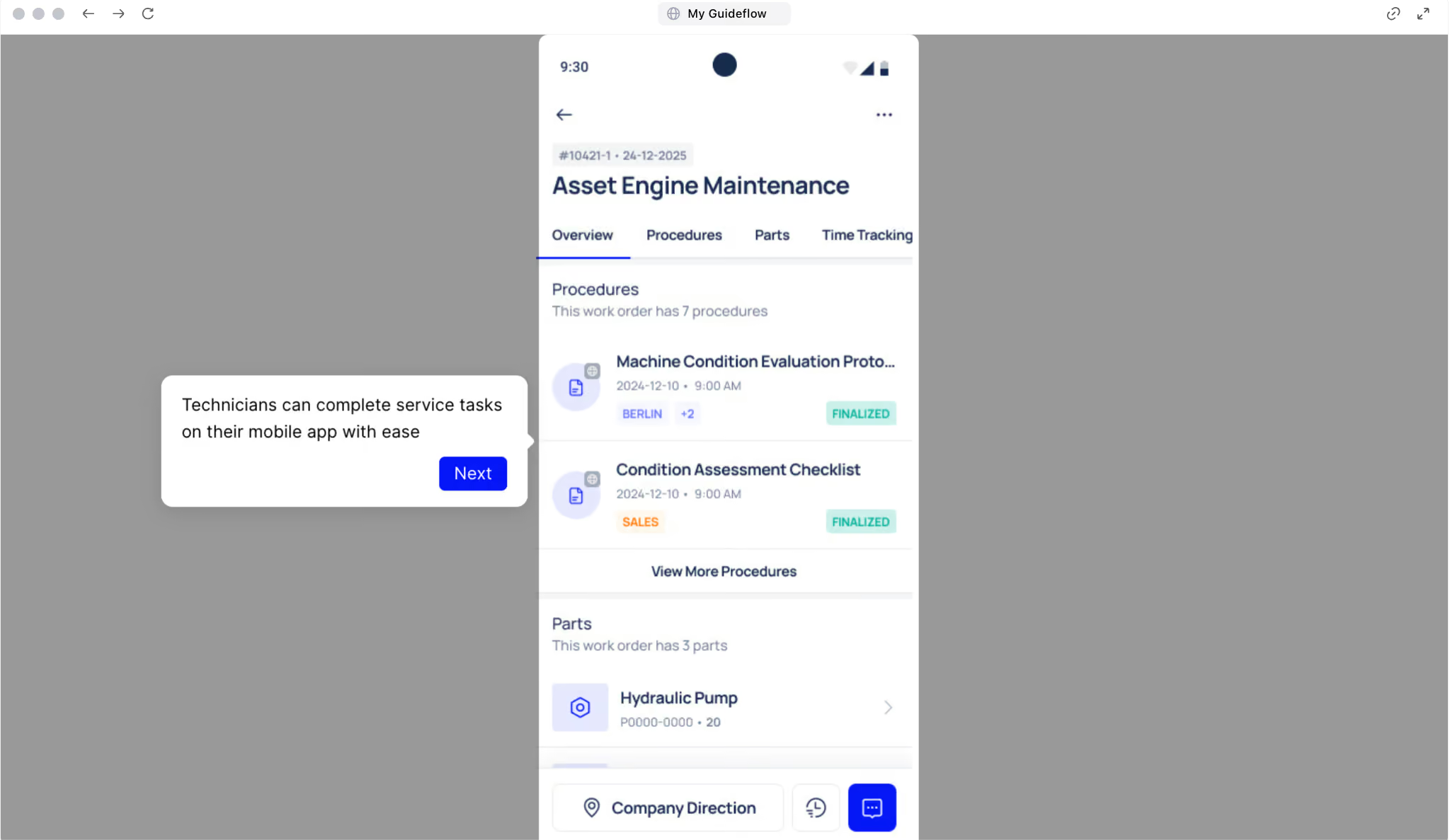
Fleet maintenance doesn't happen at a desk. Technicians are in workshops, on the road, or under vehicles. If the software doesn't work on their phone, it doesn't get used.
Makula's mobile app (iOS and Android) gives technicians full access to work orders, asset records, checklists, and the AI Copilot from anywhere. The app supports offline mode, so teams working in areas with poor connectivity can keep logging work. Data syncs automatically once they're back online.
Here's what technicians can do from the app:
- Create, update, and close work orders on the go
- Complete digital inspections with photo attachments
- Scan QR codes to pull up vehicle profiles instantly
- Record voice notes through the AI Notetaker
- Check parts availability before starting a repair
Makula Pros and Cons
Pros:
- AI Copilot and Notetaker for voice-based reporting and instant troubleshooting
- Central Asset Hub with linked manuals and full vehicle histories
- Automated preventive maintenance with calendar and condition-based triggers
- Supports mixed fleets (vehicles, equipment, and machinery in one system)
- Intuitive interface and offline mobile access
- Modular design that scales with fleet size
Cons:
- Some advanced features require setup and user training
Makula Pricing
Makula's pricing plan starts at €55 per user per month. Pricing varies based on team size and integrations. Contact the team for more details.
Fleetio
Fleetio is a fleet management platform that covers vehicle maintenance, fuel tracking, inspections, and expense management. It's built for mid-size fleets that want strong analytics without the complexity of enterprise tools.
The platform handles preventive maintenance scheduling, digital inspections, and outsourced maintenance through a network of service shops.
Fleetio's fuel management module integrates with fuel cards from providers like Comdata and FLEETCOR to automatically import fuel data. This makes it easy to track consumption, spot inefficiencies, and estimate cost per mile across the fleet.
Fleetio doesn't include built-in GPS tracking. You'll need a third-party telematics integration for live vehicle location data.
Key Features
- Preventive maintenance scheduling that sends automated reminders before service is due
- Fuel management that integrates with fuel cards to track consumption and cost per mile
- Digital vehicle inspections that drivers complete from the mobile app with photo proof
- Outsourced maintenance network that connects fleets with pre-approved service shops
- Customisable analytics dashboards that break down costs by vehicle, location, or time period
- Barcode scanning that lets technicians identify assets and pull up records in seconds
- Third-party telematics integrations that bring GPS and diagnostic data into one view
Fleetio Pricing
Fleetio offers three plans: Essential starts at $4 per vehicle per month ($5 monthly billing), Professional starts at $7 per vehicle per month, and Premium starts at $10 per vehicle per month, both billed annually.
MaintainX
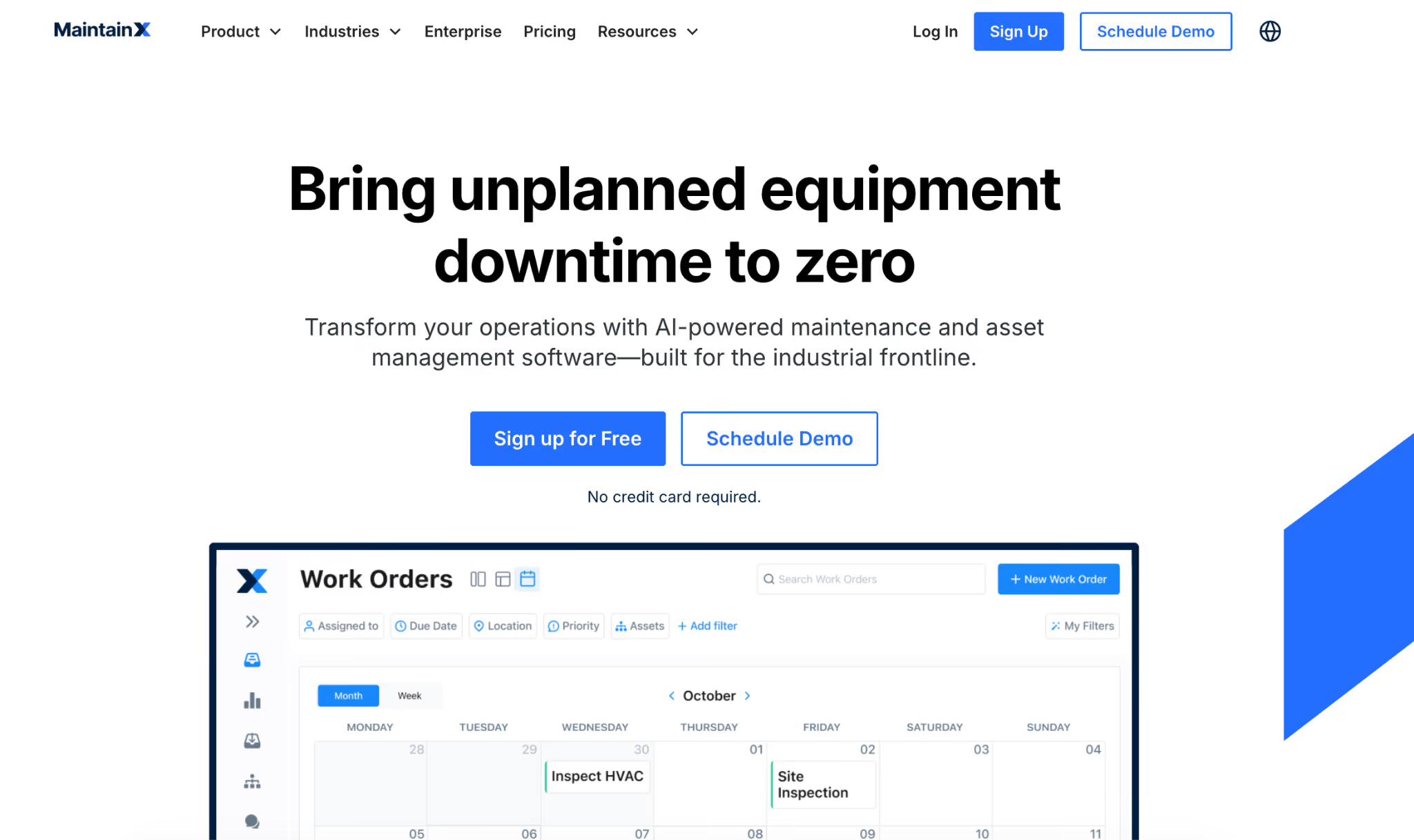
MaintainX is a mobile-first CMMS used for maintenance and operations management. The platform is known for its interface and onboarding, making it a popular choice for teams that need to get up and running quickly.
For fleet teams, MaintainX offers preventive maintenance scheduling, asset tracking, and parts inventory management. It supports multi-site management, so companies with vehicles across multiple locations can standardise workflows from a single account. Work orders can be triggered automatically based on time intervals or meter readings.
Read more: MaintainX Alternatives
Key Features
- Mobile-first work orders that technicians create, update, and close from their phones
- AI-assisted SOP generation that builds procedures and checklists from a few simple inputs
- Preventive maintenance scheduling that triggers work orders by time interval or meter reading
- Multi-site management that standardises workflows across all fleet locations from one account
- Real-time messaging built into work orders so teams communicate without switching apps
- Parts inventory tracking that links stock levels to assets and upcoming maintenance tasks
- Pre-built integrations with SAP, IoT sensors, and Zapier to connect existing systems
MaintainX Pricing
MaintainX offers four plans: Basic is free, Essential starts at $20 per user per month ($25 monthly billing), Premium starts at $65 per user per month ($75 monthly billing), and Enterprise has custom pricing.
Samsara
Samsara is a cloud-based IoT platform that combines hardware devices (vehicle gateways, AI dash cams, asset trackers) with fleet management software. It provides real-time GPS tracking, driver safety tools, and maintenance management in one dashboard.
Samsara's plug-and-play hardware installs in under 15 minutes per vehicle, and its GPS refresh rate collects data every second.
For maintenance, Samsara offers preventive maintenance scheduling, digital DVIRs (driver vehicle inspection reports), and automated work orders triggered by fault codes or usage thresholds. Predictive diagnostics use engine data to flag potential issues before they cause breakdowns.
Key Features
- Real-time GPS tracking with one-second refresh rate for near-live fleet visibility
- AI dash cams that detect unsafe driving and deliver in-cab voice coaching automatically
- Preventive maintenance scheduling that triggers work orders from fault codes and usage data
- Digital DVIRs that drivers complete on their phone for paperless pre-trip and post-trip inspections
- Fuel analytics that track consumption, idle time, and estimated cost across the fleet
- Route optimisation that uses traffic predictions to plan the most efficient daily schedule
Samsara Pricing
Samsara offers Safety Premier and Safety Enterprise plans, with pricing available through custom quotes.
Simply Fleet
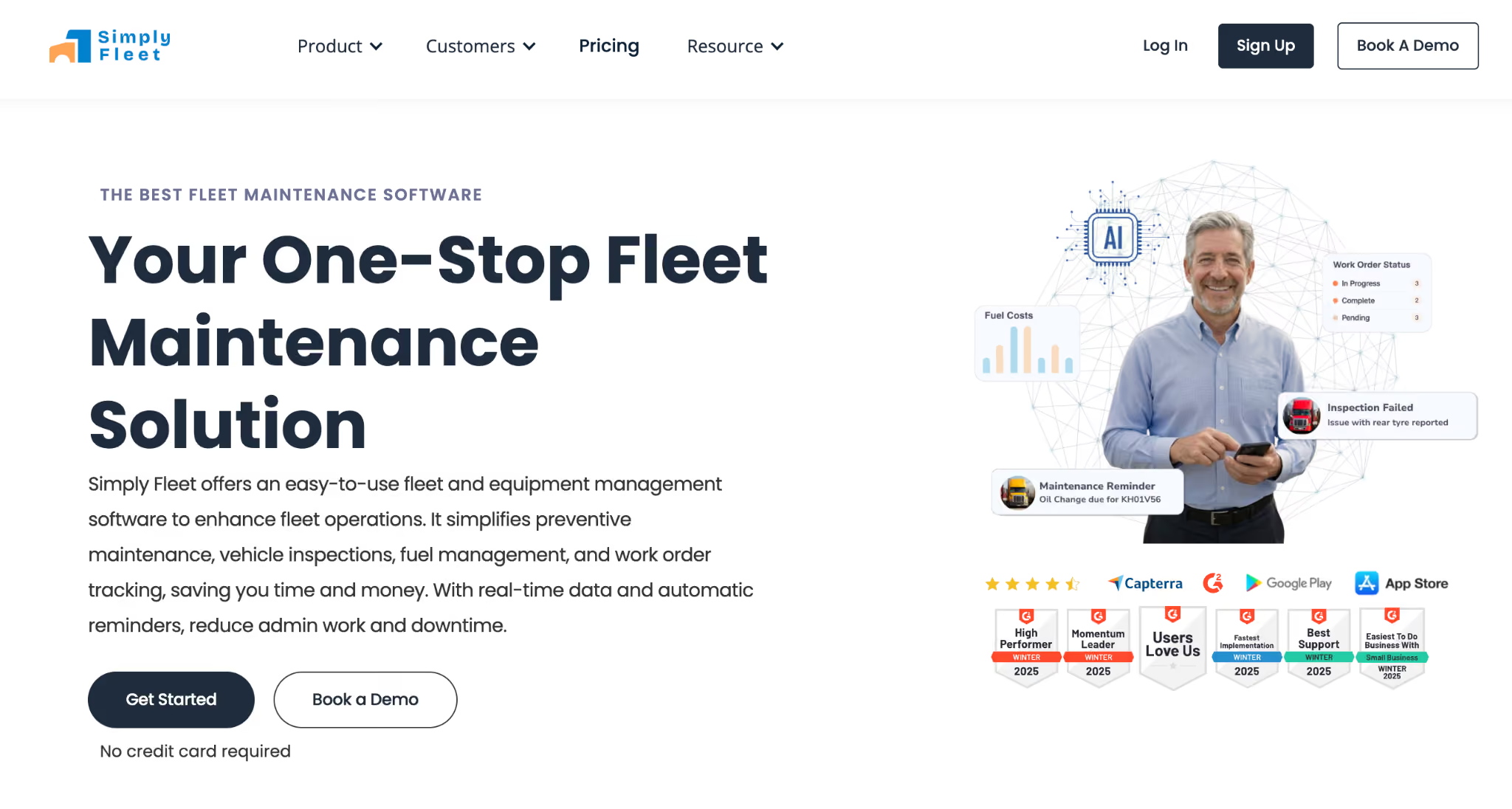
Simply Fleet is a fleet management tool designed for small and mid-size operations. It focuses on making fleet maintenance accessible without the complexity or cost of enterprise platforms.
What sets Simply Fleet apart is its approach to data entry. The app supports voice logging for fuel and mileage, AI-powered receipt scanning, and barcode scanning. All designed to reduce manual input. The "Simply Ask" feature lets managers query their fleet data in plain English and get instant answers without building custom reports.
Simply Fleet is a good starting point for teams moving off spreadsheets. It's easy to set up, doesn't require training, and includes a free plan for up to five vehicles. For larger fleets, paid plans add features like custom inspection forms, compliance tracking, and parts inventory.
Key Features
- Voice logging that lets drivers record fuel and mileage entries hands-free
- AI-powered receipt scanning that reads invoices and logs details automatically
- Preventive maintenance reminders that alert teams before service intervals are missed
- Customisable inspection forms that match your fleet's specific vehicle types and protocols
- Fuel tracking that monitors consumption trends and flags cost anomalies
- Natural language queries that let managers ask fleet data questions in plain English
Simply Fleet Pricing
Simply Fleet offers two plans: Essential starts at $2 per vehicle per month, and Advanced starts at $4 per vehicle per month.
UpKeep
UpKeep is a CMMS used across manufacturing, facilities management, and fleet maintenance. The platform connects with IoT devices to monitor equipment conditions in real time and trigger maintenance automatically when thresholds are met.
UpKeep's AI-powered Smart Scheduler assigns the right technician to each task based on workload, expertise, and availability. The mobile app supports field-friendly features like voice-entry for notes, barcode scanning, and automated checklists generated from historical data.
The platform also offers detailed reporting on maintenance costs, asset performance, and team productivity. It integrates with ERP systems, telematics providers, and accounting tools.
Read more: UpKeep CMMS Pricing
Key Features
- IoT sensor integration that monitors equipment conditions and triggers maintenance automatically
- AI-powered Smart Scheduler that assigns technicians based on workload and expertise
- Preventive maintenance scheduling that keeps service intervals consistent across the fleet
- Parts and inventory management that tracks stock in real time and sends low-stock alerts
- Mobile app with voice-entry and barcode scanning so technicians update records from the field
- Custom reporting dashboards that break down maintenance costs, asset performance, and team productivity
- ERP and telematics integrations that unify fleet data across existing business systems
UpKeep Pricing
UpKeep offers four plans: Essential starts at $20 per user per month, Premium starts at $55 per user per month, while Professional and Enterprise plans require custom quotes.
Whip Around
Whip Around is a fleet inspection and maintenance platform with a strong focus on compliance. It helps fleet teams digitise driver vehicle inspection reports (DVIRs), manage defect tracking, and automate maintenance workflows triggered by inspection results.
The standout capability is Whip Around's DOT-compliant inspection forms. Drivers complete pre-trip and post-trip inspections on their mobile device, with guided prompts, photo attachments, and digital signatures. When a defect is flagged, the system can automatically generate a work order and route it to the maintenance team.
Whip Around also offers preventive maintenance scheduling, asset tracking, and basic reporting. Integration options include connections with Fleetio, Samsara, and several telematics providers.
Key Features
- DOT-compliant digital DVIRs that guide drivers through every inspection step
- Photo and signature capture that documents vehicle condition with verifiable proof
- Automated defect-to-work-order workflows that route flagged issues directly to the maintenance team
- Preventive maintenance scheduling that keeps vehicles on a consistent service cycle
- Asset tracking that stores full service history and links it to each vehicle
- Mobile app for iOS and Android that works for drivers and technicians in the field
Whip Around Pricing
Whip Around offers four plans: Basic is free, Standard starts at $5 per asset per month, Pro starts at $9 per asset per month, and FixedUnlimited has custom fixed pricing.
How to Choose the Right Fleet Maintenance Software
With this many options on the market, the right choice depends on your fleet type, team size, and the problems you're trying to solve.
Here's a structured way to evaluate your options:
Match the Software to Your Fleet Type
If you only manage vehicles, a fleet-specific tool like Fleetio or Samsara can cover your needs. But many operations today manage more than just trucks. If your team is responsible for vehicles alongside heavy equipment, generators, or production machinery, you need a CMMS that supports multiple asset types in one system.
Running separate tools for vehicles and equipment creates data silos, duplicated work, and gaps in maintenance coverage.
A unified platform like Makula lets you track every asset, from delivery trucks to factory machinery, with one set of workflows, one reporting dashboard, and one team.
Evaluate Total Cost of Ownership
Don't compare subscription prices alone. The sticker price is just the starting point. Factor in hardware costs (for telematics-based platforms), implementation and onboarding fees, training time, and what happens to pricing as your team grows.
Per-vehicle pricing looks cheap at a small scale but can climb fast as your fleet expands. Per-user models can get expensive for larger maintenance teams.
Ask vendors for a total cost of ownership estimate that includes every fee, not just the headline subscription.
Test the Mobile Experience
A fleet maintenance platform is only as good as its adoption rate. If your technicians find the app clunky, slow, or confusing, they'll stop using it within weeks. And if the data doesn't go in, the reports that come out are useless.
Ask for a trial and put the mobile app directly in front of your field team. Have them create a work order, complete an inspection, and look up a vehicle's history. Their feedback will tell you more than any demo.
Check Integration Compatibility
Your fleet maintenance software needs to work with the tools you already use. Ask about pre-built integrations and API access before signing.
The fewer manual data transfers your team has to do between systems, the more reliable and complete your maintenance records will be. A platform that doesn't integrate is a platform that creates more work.
Start With Your Biggest Pain Point
Not every fleet has the same problem. If compliance is your biggest risk, prioritise inspection workflows and audit-ready documentation. If unplanned downtime is costing you the most, focus on preventive maintenance automation and condition-based triggers.
If institutional knowledge is walking out the door every time an experienced technician leaves, look for AI-powered knowledge capture and voice documentation.
Matching the software to your most urgent problem makes sure you see value fast, which also helps justify the investment to leadership.
Makula Is the Best Fleet Maintenance Software in 2026
Most fleet maintenance tools are built for trucking fleets. They track vehicles, log mileage, and send service reminders. For fleets that only manage trucks and vans, that works.
But operations running vehicles alongside heavy equipment, generators, or industrial assets quickly run into gaps. Maintenance data ends up spread across different systems with no single view of asset health.
Makula solves this by combining fleet maintenance and industrial asset management in one platform. It includes automated preventive scheduling, structured work orders, real-time parts tracking, and an AI Copilot that surfaces answers from your maintenance data.
Book a demo to see how Makula helps reduce downtime, control maintenance costs, and manage your entire fleet from one system.





