

One PM on one asset is manageable. A hundred PMs across dozens of assets, multiple shifts, and different production lines is a programme and a programme needs fundamentally different software to run it well.
This is where many maintenance operations hit a wall. They start with good intentions: a handful of scheduled tasks, a basic system, and a team that knows what needs doing. Then the asset base grows. Compliance requirements tighten. Auditors start asking questions. And suddenly the approach that worked for 20 assets is buckling under the weight of 200.
Preventive maintenance programme software is supposed to close that gap. But not every platform scales. Some handle individual tasks well and fall apart the moment you try to standardise, delegate, and report across an entire operation.
Here's what this guide covers:
- Why one off PMs create a compliance and management problem at scale
- The buying criteria that separate scalable platforms from the rest
- What to look for in procedures, scheduling, roles, and roll up reporting
- A side by side evaluation table for vendor comparison
- FAQs for buyers at the final decision stage
Why One Off PMs Don't Build a Programme
There's a common pattern in maintenance operations that grow without the right software behind them. Early on, someone creates a PM task for a critical piece of equipment. It works. They create another. And another. Before long, the system contained hundreds of individual tasks with no consistent structure, no standardised procedures, and no way to see the whole picture at once.
This isn't a discipline problem, it's a design problem. Platforms that handle individual tasks well are not always built to manage a structured PM programme across a large asset base. The difference matters in three specific ways.
Consistency breaks down. Without standard procedures, two technicians servicing identical machines may follow entirely different steps. One documents observations; the other doesn't. One replaces a part; the other defers it. The result is a maintenance record that looks complete but isn't comparable or auditable.
Scheduling becomes unmanageable. When every PM is created individually, scaling to hundreds of assets means hundreds of manual scheduling decisions. Miss one, and there's no systematic flag to catch it. Duplicate one, and resources get wasted without anyone noticing.
Compliance reporting fails under scrutiny. When an auditor asks for a compliance summary across a production line or a site, a system built on one off tasks cannot produce it reliably. The data is there, technically but it's fragmented, inconsistent, and requires significant manual effort to compile.
A genuine preventive maintenance management platform solves all three problems by design, not by workaround.
See How to Scale Preventive Maintenance Across Hundreds of Assets
Discover how leading manufacturers standardize PM procedures, automate recurring schedules, and maintain compliance across multiple lines and sites. See how Makula helps maintenance teams scale preventive maintenance programs without adding administrative complexity.

The Buying Criteria That Define a Scalable PM Programme

When you're evaluating preventive maintenance programme software at the buyer decision stage, four capability areas separate platforms that scale from those that don't.
Standard Procedures and PM Templates
The foundation of any scalable PM programme is the ability to define a task once and apply it consistently across every relevant asset.
A PM template or standard procedure is more than a checklist. It should contain:
- Step by step task instructions that don't vary between technicians or shifts
- Required parts, tools, and reference documents linked directly to the procedure
- Mandatory fields, readings, or observations that must be completed before sign off
- Version control so that procedure updates propagate across all linked assets
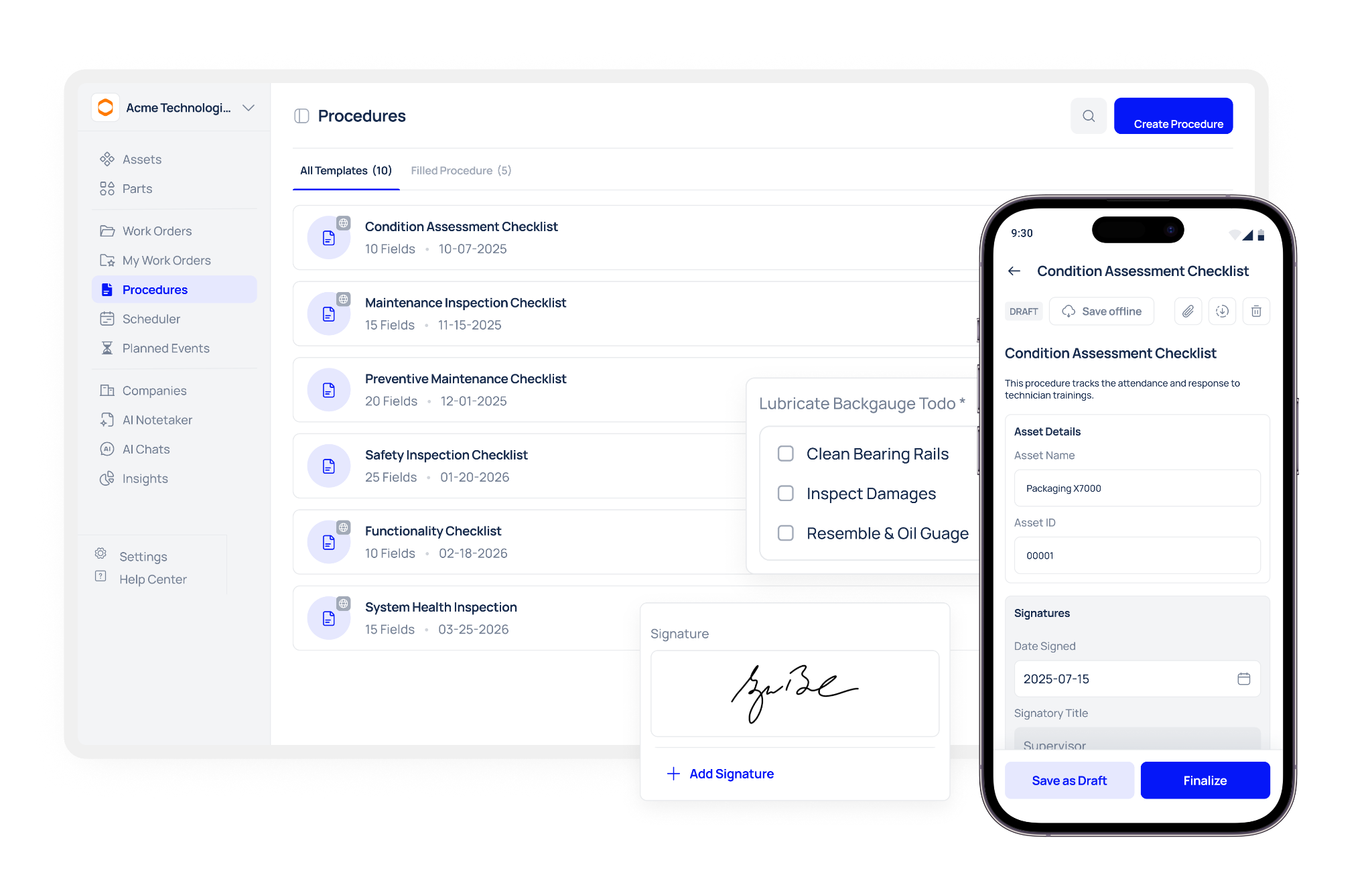
Without this, every asset's PM is effectively custom built which means every asset is a potential inconsistency waiting to become an audit finding.
When evaluating vendors, ask to see how a single procedure update is applied across an asset class. If the answer involves editing each PM individually, that platform is not built for scale.
Recurring Schedules at Scale
Recurring PM scheduling for a single asset is a table stakes feature. Recurring scheduling across hundreds of assets, maintaining individual frequencies, completion date anchoring, and automatic work order generation for each that's where platforms diverge.
Look for:
- The ability to assign the same schedule logic to an entire asset class, line, or category in one action
- Automatic rescheduling from the completion date, not the original due date, so schedules don't drift over time
- Bulk editing tools that allow frequency changes across multiple assets without rebuilding each schedule individually
- Work order generation that happens automatically at the right time, with pre populated procedures and assignments, without requiring planner input for every cycle
Ask vendors what happens when a PM is completed three days late. Does the next occurrence reschedule from the original due date or the actual completion date? The answer tells you a great deal about how the scheduling engine was designed.
Roles, Permissions, and Accountability Structures
A PM programme that's shared across maintenance teams, supervisors, operations managers, and compliance officers requires clearly defined roles not a single login that everyone uses differently.
Maintenance software user roles should allow you to:
- Define what each user type can see, create, edit, and approve
- Assign PMs to specific technicians or teams based on area, asset class, or skill set
- Require supervisory or managerial sign off for compliance critical tasks before a work order can be closed
- Restrict access to procedure libraries and scheduling configurations to prevent accidental changes
This isn't just an organisational preference. In regulated environments, the ability to demonstrate that only authorised personnel can approve certain records is a compliance requirement, not a nice to have. If a platform gives everyone the same level of access or relies on informal conventions to manage accountability, it creates a liability.
Compliance Roll Ups Across Assets, Lines, and Sites
Individual asset records matter. But at programme scale, what leaders and compliance officers need is the ability to aggregate those records into a coherent picture by line, by production area, or by site without manual effort.
PM compliance roll up reporting is the capability that makes this possible. When evaluating a vendor, look for:
- Dashboard views that show programme wide completion rates, broken down by line, asset class, or site
- The ability to filter compliance status by time period, PM type, or responsible team
- Pre built or configurable reports that can be exported quickly in a format suitable for auditors
- Clear visibility into which lines or areas are consistently underperforming on PM completion
A platform that can only report at the individual work order level forces your team to compile programme level evidence manually every time it's needed. At scale, that overhead becomes a significant operational burden and a risk when audit timelines are short.
When to Spot Scalability Gaps During a Demo
Demos are carefully choreographed. Vendors will show you the features that look most impressive. Your job is to ask about the scenarios they haven't rehearsed.
These questions will reveal scalability gaps that wouldn't surface in a standard walkthrough:
- Apply a procedure update across an asset class. How many steps does it take to push a checklist change to all 40 machines of the same type?
- Generate recurring work orders for 50 assets at once. Is this done in bulk, or does each asset need to be configured individually?
- Show the programme level compliance dashboard. Can you filter PM completion rates by production line without running a manual export?
- Demonstrate role based access. What does a technician see that a supervisor doesn't? What does a compliance officer see that a planner doesn't?
- Show what a missed PM looks like in the reporting. Is it flagged, recorded, and included in compliance calculations automatically?
A vendor that handles all five without hesitation has built for programme scale. One that navigates around any of them has shown you where the limits are.
PM Programme Software Evaluation: At a Glance
Use this table to compare vendors against the criteria that matter for scaling.
Common Mistakes When Evaluating PM Programme Platforms
Even experienced buyers make avoidable errors at this stage. Here are the most common ones.
Evaluating features individually rather than as a system. Templates, scheduling, roles, and reporting need to work together seamlessly. A platform with strong templates and weak reporting still fails at programme scale; it just fails later.
Accepting "it can be configured" as an answer. Some platforms can technically do what you need but only after a lengthy implementation project, professional services engagement, or custom development. Ask to see the capability live, not as a future roadmap item.
Ignoring how the platform handles growth. Platforms that work at 50 assets aren't always designed to handle 500. Ask vendors about customers who have scaled significantly, and ask specifically what broke or required re architecture when they did.
Underestimating change management needs. A scalable PM programme requires technician adoption, not just manager approval. Platforms with complex mobile interfaces or steep learning curves will see lower completion rates regardless of how good the scheduling engine is.
Conclusion
Scaling a preventive maintenance programme isn't a matter of adding more tasks to the same system. It requires a platform built around programme logic: standard procedures that apply consistently across asset classes, recurring schedules that manage themselves, role based accountability that holds up under scrutiny, and compliance reporting that aggregates across lines and sites without manual assembly.
The platforms that can deliver all of that are a smaller group than most vendor shortlists suggest. The evaluation criteria in this guide help you identify which ones genuinely belong in that group and which ones will create new administrative burdens as your programme grows.
Book a demo to see how a single PM template scales across an entire asset class in Makula, and watch the work orders, schedules, and compliance records build themselves.





