
.avif)
You have heard the excuse before: "Someone keeps promising an updated spreadsheet, but it is always out of date." This is one of the most common frustrations highlighted in every real-world spreadsheet vs. CMMS comparison.
It is a frustrating reality for many maintenance and operations teams. You need to know the exact status, location, and maintenance history of your equipment, but the document you rely on is already obsolete the moment someone hits save. When asset data is scattered, inaccurate, or buried under endless rows of text, your entire operation slows down.
If you are tired of chasing down information, it might be time to upgrade your system. But what exactly should you upgrade to? In this guide, we will break down the core differences between a basic spreadsheet, a dedicated asset register, and a fully functional Computerised Maintenance Management System (CMMS). By the end, you will know exactly when to make the leap and how to get started.
The Problem with the Standard Spreadsheet
Spreadsheets are brilliant tools for financial modelling and quick calculations. However, when you use them to manage hundreds or thousands of moving parts, they quickly become a liability.
The biggest issue is version control. If two team members update a file at the same time, or if someone forgets to log a repair, your data is compromised. There are no automated alerts for upcoming maintenance, no easy ways to attach instruction manuals, and no real-time updates. When comparing a spreadsheet vs. CMMSs, the spreadsheet vs CMMS debate quickly highlights that the spreadsheet relies entirely on flawless human memory and constant manual input, which inevitably leads to errors. In every discussion of spreadsheet vs. CMMS, it becomes clear that a manual spreadsheet system simply cannot keep pace with the dynamic needs of asset management, unlike a dedicated CMMS solution.
The Middle Ground: The Asset Register
An asset register is a step up from a basic spreadsheet. It serves as a formal list of all the assets your organisation owns. This system is often part of your accounting software or a specialised database.
An asset register gives you a central source of truth for your equipment inventory. It usually includes details like purchase dates, depreciation values, and serial numbers. While it is excellent for financial audits and tracking what you own, it falls short when managing daily operations. It tells you that an asset exists, but it will not help you schedule preventative maintenance or track work orders.
The Ultimate Solution: A CMMS
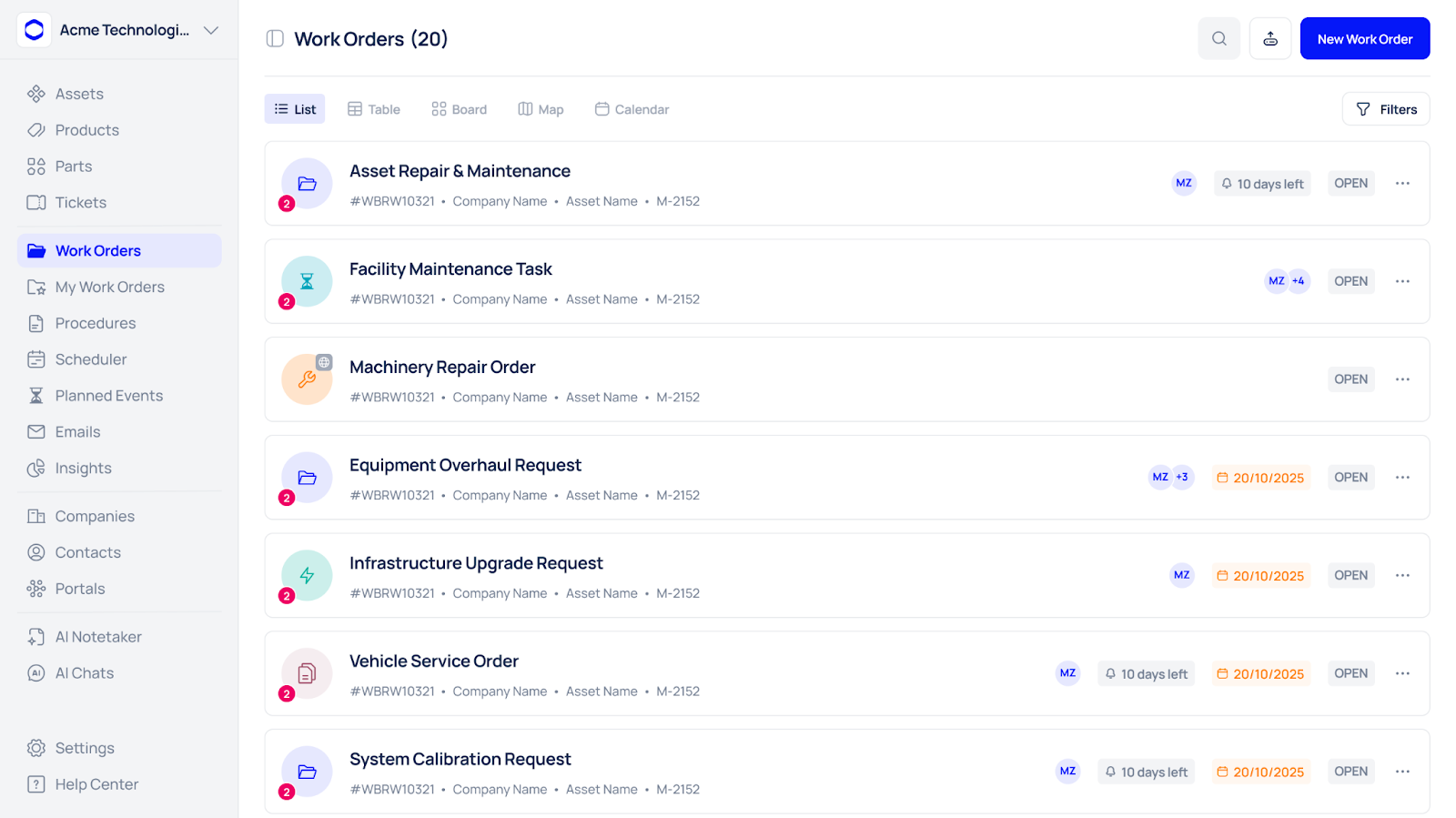
A Computerised Maintenance Management System (CMMS) takes your asset data and makes it actionable. It is a dynamic platform designed specifically to handle the entire lifecycle of your equipment.
With a CMMS, you do not just see a list of machines. You see their real-time health, upcoming maintenance schedules, past repair histories, and assigned technicians. Platforms like Makula allow your team to update records instantly from the factory floor using mobile devices. This means no more waiting until the end of the shift to log a repair.
When evaluating a spreadsheet vs. CMMS, it becomes clear that the spreadsheet vs. CMMS choice is pivotal for efficient asset management. The CMMS completely transforms your data from a static historical record into a proactive tool; this is one of the main advantages in the spreadsheet vs. CMMS debate. With the right spreadsheet vs CMMS approach, you can significantly reduce downtime, save money, and empower your team to act with real-time insights, rather than relying on outdated spreadsheets.
Spreadsheet vs CMMS: Making the Right Choice
Choosing the right tool depends entirely on your current operational scale and the complexity of your maintenance needs.
If you run a small office with five computers and a single printer, a spreadsheet might be perfectly fine. However, if you manage a manufacturing plant, a fleet of vehicles, or a facility with stringent compliance requirements, clinging to manual entry is dangerous. The true cost of the spreadsheet vs. CMMS debate is not just the price of the software; it is the cost of unexpected breakdowns, failed audits, and wasted labour hours. When you look at spreadsheet vs cmms, it becomes obvious that spreadsheets simply cannot keep up with the ever-changing needs of complex operations. Every time you weigh up spreadsheet vs. CMMS, remember that a modern CMMS provides real-time oversight while manual spreadsheets drag you backwards. For many organisations, the difference made by choosing a CMMS in the spreadsheet vs. CMMSs comparison is the difference between staying ahead and falling behind.
A modern CMMS like Makula provides automated workflows, predictive maintenance insights, and seamless reporting. You stop reacting to problems and start preventing them.
Comparison Matrix: Spreadsheet, Register, and CMMS
To make the decision easier, here is a breakdown of how these three systems compare across key operational metrics.
How to Know It Is Time to Upgrade
Still unsure if you are ready to ditch the manual tracking? Look out for these common warning signs:
- You fail internal audits: If you cannot quickly produce maintenance records or prove equipment compliance, your system is failing you.
- Preventative maintenance is ignored: If machines only get fixed when they break completely, you need automated scheduling.
- Knowledge hoarding: If only one person in the building knows how to read the maintenance log, you are at massive risk if they leave.
- Lost assets: If you frequently buy replacement parts or equipment because you cannot find the original ones, you need a better tracking system.
If any of these sound familiar, it is time to move away from static files and build a dynamic asset management strategy.





