
Maintenance teams do not lose time because work orders exist. They lose time because the process around them is broken.
A request comes in through email. A planner asks for more details. A technician waits for assignment. Parts are not reserved. Completion notes arrive late or incomplete. By the time the job is closed, everyone has spent more time managing the work order than fixing the asset.
That is why modern maintenance teams need a workflow built for speed, visibility, and accountability. In Makula, work orders move from request to assignment to completion in a simple process that keeps everyone aligned and the data clean from the start
Does your maintenance process feel like a relay race where every handoff results in a dropped baton? A work request comes in via email, which you then forward to a planner for approval. The planner responds to all, asking for more details. The technician eventually receives the job assignment, but the original request gets lost among a dozen email responses. By the time the work is completed, logging the outcome requires another series of messages. What should take just minutes for approvals and lifecycle steps instead takes days when relying on email.
This disjointed and slow process is a common symptom of a broken work order workflow. When your system relies on manual forwarding and chasing information through email chains, you lose time, money, and valuable data. Every delay adds to equipment downtime and technician frustration.
But what if you could manage the entire lifecycle of a work order from creation to resourcing to completion in just three clicks? It is not a fantasy; it is the reality of a modern, streamlined work order workflow. This guide will show you how to escape the email trap and embrace a faster, more efficient way of managing maintenance.
The Problem with an Email-Based Workflow
Using email as a de facto maintenance management system is incredibly common, but it is also incredibly inefficient. It creates significant bottlenecks that slow down your entire operation.
The core issues include:
- Lack of Visibility: Who has the task now? Has it been approved? Is the work started? With email, answers to these questions are never clear. There is no central dashboard to see the status of all jobs.
- Delayed Approvals: An urgent request can sit in a manager's inbox for hours or days, waiting for a simple "yes." This single point of failure can halt production.
- Lost Information: Critical details like asset numbers, fault descriptions, and attached photos get lost in long email threads. Technicians arrive unprepared, leading to wasted trips.
- No Data for Analysis: How can you track metrics like Mean Time to Repair (MTTR) or first-time fix rates when all your data is scattered across hundreds of individual emails? You cannot.
An effective work order workflow needs to be a single, transparent pipeline, not a messy web of forwarded messages.
The 3-Click Revolution: Create, Resource, Close
Imagine a world free from the clutter of maintenance emails. A modern Computerised Maintenance Management System (CMMS) transforms this vision into a simple, three-click reality. The entire process becomes visible, instant, and trackable.
Click 1: Create
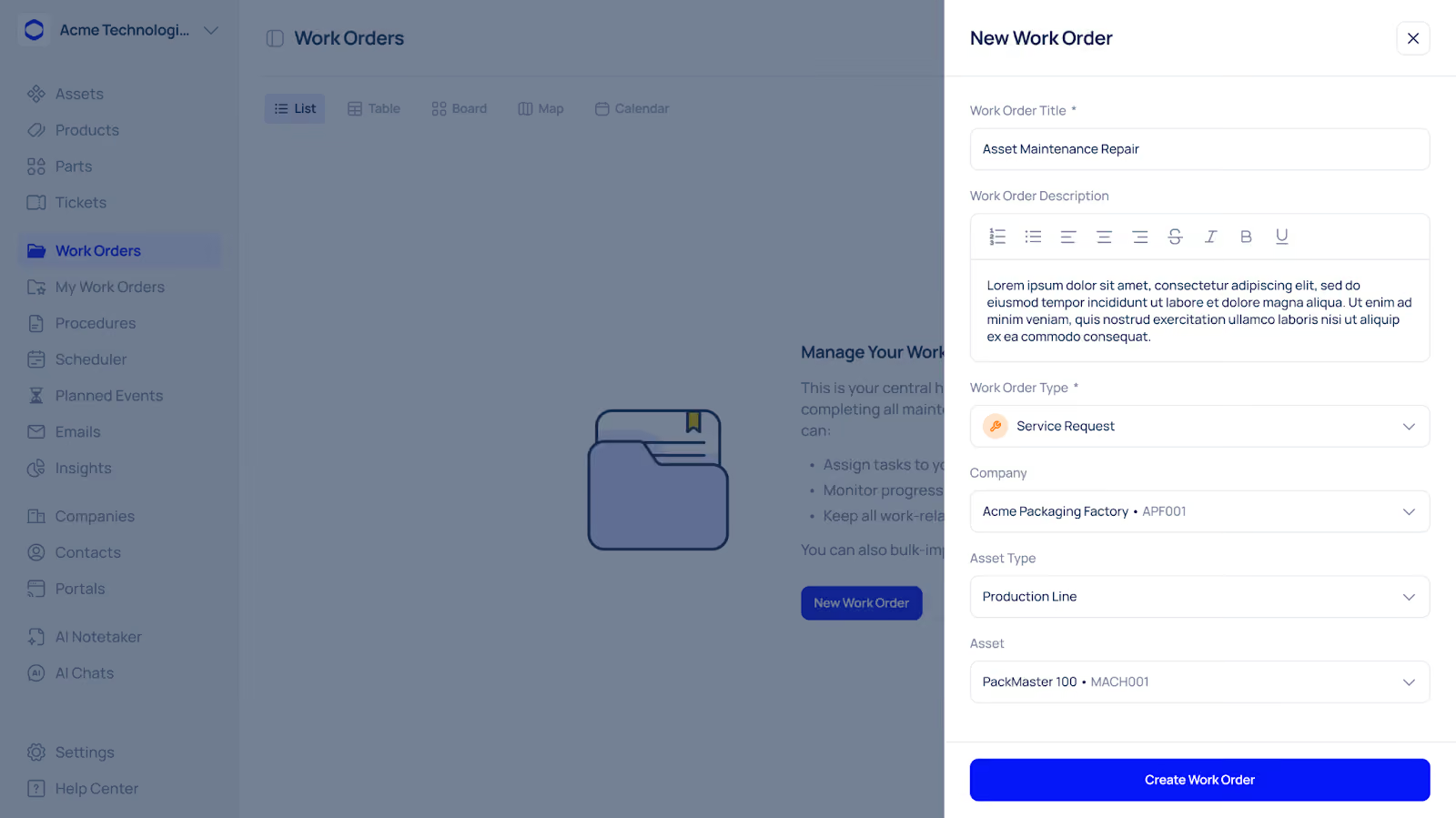
An operator on the factory floor notices a fault. Instead of sending an email, they open a mobile app, scan the asset's QR code, select a predefined fault from a dropdown list, and hit "submit." A new work order is instantly created in the system with all the necessary information, including asset ID, location, and problem description. The right manager is automatically notified.
Click 2: Resource
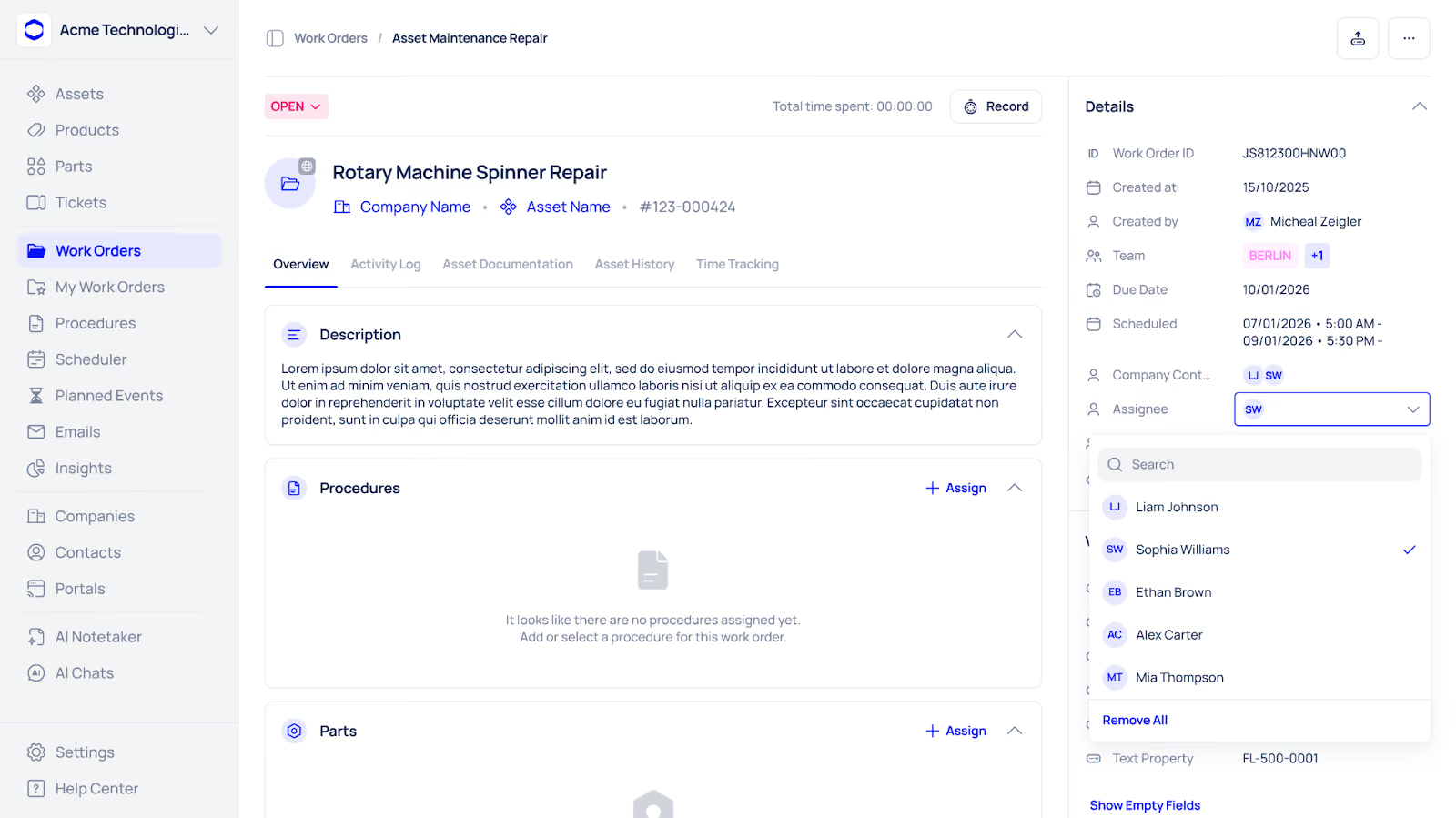
The maintenance planner sees the new work order appear on their dashboard. With one click, they can see the asset's history and the required skills for the job. They assign the work order to an available technician with the correct expertise. The technician immediately receives a notification on their mobile device with all the job details, including instruction manuals and required parts.
Click 3: Close

Once the repair is finished, the technician opens the work order on their device. They log their hours, note the parts used, and select a completion code from a standardised list. They hit "close." The work order is instantly updated, the planner is notified, and all the data is logged for future analysis.
This streamlined work order workflow, managed within a platform like Makula, eliminates delays, ensures data accuracy, and gives everyone on the team complete visibility from start to finish.
Key Benefits of a Streamlined Workflow
Adopting a three-click approach does more than just save time. It delivers tangible benefits across your entire maintenance department.
By optimising your work order workflow, you transition your team from being reactive firefighters to proactive problem-solvers. A system like Makula provides the structure needed to make this happen.
Why this workflow matters
A streamlined work order process helps maintenance teams:
- reduce delays between request and action
- keep every job visible from start to finish
- give technicians the information they need before they go to the asset
- standardise close-out data for better reporting
- improve accountability across the maintenance team
Conclusion
A good CMMS should do more than store work orders. It should help your team move faster, communicate better, and capture cleaner data at every step. That is what makes work order management useful in day-to-day operations, not just in reports. With Makula, your team can manage the full work order lifecycle in one place, without the email chaos.





