
Unplanned downtime is one of the most disruptive and expensive problems in manufacturing. A single stalled machine or unexpected stop can delay orders, waste labor, and cut deeply into production output.
The core issue isn’t just downtime itself. It’s the lack of accurate visibility into when downtime happens, why it happens, and how often it impacts production. Effective downtime tracking is about identifying patterns, finding root causes, and preventing failures that keep coming back.
In this guide, we’ll break down what production downtime tracking is, the best methods to track it, the key metrics, and how to build a system that reduces unplanned stops and improves plant performance.
What Is Production Downtime Tracking?
Production downtime tracking is the process of recording every instance when equipment, a line, or an entire process stops running during scheduled production time. It gives teams a clear view of how often downtime occurs, how long it lasts, and what causes it.
Effective tracking distinguishes between:
Downtime vs. Small Stops vs. Performance Losses
This distinction is important because each type affects productivity differently and requires different corrective actions:
- Downtime: Any stop long enough to impact production and require intervention.
- Small stops: Brief interruptions (seconds to a minute) often caused by minor jams, misfeeds, or resets.
- Performance losses: When equipment is running slower than its ideal speed but hasn’t fully stopped.
Planned vs. Unplanned Downtime
Both planned and unplanned downtime should be tracked to understand true asset performance, identify improvement opportunities, and calculate metrics like OEE (Overall Equipment Effectiveness) accurately.
- Planned downtime: Scheduled stoppages such as changeovers, sanitation, inspections, or planned maintenance.
- Unplanned downtime: Unexpected breakdowns, material shortages, operator errors, or technical faults.
Examples of Production Downtime Events
Here are some of the most frequent scenarios manufacturing teams encounter:
- Conveyor or equipment breakdowns
- Changeovers taking longer than expected
- Material shortages or delays
- Misaligned or failed sensors
- Electrical or mechanical faults
- Software or PLC errors
Tracking these events consistently gives teams the data needed to reduce machine downtime and improve line stability.
Why Production Downtime Tracking Is Essential
Production downtime tracking provides manufacturers with a factual view of how equipment and processes perform in real-world operating conditions.
Without reliable data, downtime is underestimated, misdiagnosed, or treated as a normal part of daily factory operations. With structured tracking in place, teams can measure losses accurately and make targeted improvements that directly increase output.
Here’s why downtime tracking is critical for operational excellence:
Reduces Unplanned Stops
Downtime tracking reveals patterns behind unexpected failures, such as repeated sensor faults, recurring mechanical issues, or inconsistencies that occur during shifts. This allows teams to fix underlying causes rather than just symptoms.
Identifies Your Biggest Sources of Loss
Not all downtime events have the same impact. Tracking helps quantify:
- Which assets fail most frequently
- Which events create the longest delays
- Which areas generate the highest operational cost
This makes it easier to prioritize high-impact fixes instead of spreading resources thin.
Strengthens OEE Accuracy
Since downtime affects the availability component of OEE (Overall Equipment Effectiveness), accurate downtime records ensure OEE reflects true performance. When availability improves, OEE improves, leading to better output with the same equipment and workforce.
Supports Better Budget and Resource Planning
Reliable service downtime data helps justify:
- Replacing unreliable equipment
- Increasing technician headcount
- Adding operator training
- Investing in automation or sensors
- Stocking critical spare parts
Clear evidence makes budget decisions easier and more defensible.
Enables Preventive and Predictive Maintenance
Downtime tracking highlights failure patterns, early warning signs, and assets that degrade over time. This helps maintenance teams:
- Build schedules around real failure behavior
- Move away from reactive fixes
- Reduce emergency repairs
- Extend equipment lifespan.
Builds a Data-Driven Operations Culture
When downtime in manufacturing is tracked consistently, teams stop relying on guesswork. Operators, maintenance, and supervisors all work from the same information, leading to better communication, faster response times, and more aligned improvement initiatives.
Methods of Production Downtime Tracking
You can use different methods to track downtime depending on your facility’s size, maturity, and available tools. Below are the four most common approaches, each clearly defined with their pros and cons.
Manual Tracking
Manual tracking is the most basic method, where operators record downtime events by hand. This usually happens on paper forms, whiteboards, logbooks, or shift reports. The operator writes down when the stop happened, how long it lasted, and why the machine stopped.
Pros:
- Simple to set up
- No software or hardware needed
- Low cost
Cons:
- Relies on memory and estimation
- Short stops are often missed
- Reasons can be inconsistent
- Difficult to analyze or compare over time
Manual tracking works for very small operations, but becomes unreliable as production grows.
Spreadsheets or Shared Databases
Instead of writing events on paper, downtime is recorded digitally, usually into spreadsheets, Google Sheets, or simple shared databases. Operators enter timestamps, durations, and reasons into predefined columns.
Pros:
- Centralises downtime information
- More structured than paper
- Can support basic reports and trend analysis
Cons:
- Still depends on manual input
- Human error remains a major factor
- Multiple versions of spreadsheets create confusion
- Not real-time
Spreadsheets are a step up from paper but still lack automation, accuracy, and scalability.
Semi-Automated Tracking
Semi-automated tracking combines machine sensors with operator input. Programmable Logic Controllers (PLCs) or sensors detect when equipment stops. Operators then select the reason for the downtime. The system tracks timing automatically. Operators handle the classification.
Pros:
- Accurate timestamps and durations
- Less reliance on operator memory
- More consistent reason coding
- Reduces manual work
Cons:
- Still limited if not connected to a unified platform
- Requires basic hardware and setup
- Depends on operators for the correct reason codes
- Analytics can be scattered across different systems
This method improves accuracy significantly but lacks full visibility unless integrated with a centralized system.
Fully Automated Downtime Tracking
Fully automated tracking uses connected systems, such as CMMS, MES, or IoT-enabled platforms, to automatically detect downtime, record durations, classify reasons, and present data in dashboards. These systems capture downtime in real time across entire lines or facilities.
Pros:
- Highest accuracy and consistency
- Real-time visibility into stops and recovery
- Consolidated data from all lines and shifts
- Enables advanced reporting and predictive improvements
- Scales easily across multiple plants
Cons:
- Requires setup and training
- Needs a structured process to maintain data quality
Key Metrics to Track Production Downtime
Tracking downtime in manufacturing becomes meaningful when it’s paired with metrics that show the size, frequency, and impact of each event. These metrics help teams understand equipment reliability, maintenance effectiveness, and the true cost of lost production time.
Below are the core metrics every plant should monitor:
Mean Time to Repair (MTTR)
MTTR measures how long it takes, on average, to repair equipment and restore it to running condition after a failure. Here’s how you calculate it:
MTTR = Total Downtime / Number of Failures
A high MTTR shows maintenance delays, lack of spare parts, or troubleshooting complexity. A lower MTTR indicates efficient repair processes.
Mean Time Between Failures (MTBF)
MTBF measures equipment reliability, the average time a machine runs before failing again. Here’s how you can calculate it:
MTBF = Total Operating Time / Number of Failures
Higher MTBF means more stable and reliable equipment. A declining MTBF signals developing problems or aging assets.
Overall Equipment Effectiveness (OEE)
OEE shows how effectively equipment is running compared to its full potential. It combines:
- Availability (impact of downtime)
- Performance (speed losses)
- Quality (defects)
Use this formula to calculate OEE:
OEE = Availability × Performance × Quality
Downtime directly affects availability, so accurate tracking is essential for meaningful OEE scores.
Downtime Duration by Reason
Downtime durations measure how many minutes or hours each downtime category consumes, mechanical, electrical, operator error, material shortage, etc.
This identifies your largest loss categories, making it easier to prioritize high-impact improvements.
Downtime Frequency
Downtime frequency counts how many times each type of downtime occurs. Some problems may not last long individually but occur so often that they cause significant cumulative loss.
True Cost of Downtime
The true cost of downtime calculates the financial impact of lost production time. Here’s how to calculate it:
Downtime Cost = (Lost Production × Unit Value) + Labor Cost + Overhead Cost
These metrics show leadership the exact cost of downtime, helping justify maintenance investments, staffing, or equipment upgrades.
Types of Production Downtime Reporting & Analysis Methods
Once downtime data is collected, the next step is understanding what it reveals. Different reporting and analysis methods help teams see patterns, identify root causes, and prioritize the issues that have the biggest impact on production.
Below are the most effective types of downtime reporting and analysis used in modern manufacturing.
Pareto Charts (Downtime by Reason)
Pareto charts rank downtime causes from highest to lowest, helping teams focus on the small number of issues responsible for most of the losses.
Useful for:
- Identifying top downtime reasons
- Prioritizing improvement actions
- Showing leadership where the biggest gains are
Downtime Heatmaps (Shift, Asset, or Time-Based Patterns)
Heatmaps visualize downtime patterns across shifts, machines, or time periods, using color intensity to show where problems cluster.
Useful for:
- Spotting shift-related issues
- Seeing which assets experience recurring failures
- Identifying trends tied to specific hours or product runs
Trend Reports (Day, Week, Month Comparisons)
Trend reports track downtime over time to highlight whether performance is improving, stable, or declining.
Useful for:
- Monitoring long-term performance
- Evaluating the impact of corrective actions
- Detecting spikes tied to product changes, staffing, or seasons
Top Losses Reports (All Production Losses Ranked)
These reports compare downtime with other types of losses, like slow cycles, small stops, and rejects, to show what hurts production the most.
Useful for:
- Understanding total loss distribution
- Balancing downtime reduction with performance and quality improvements
- Identifying which losses drive OEE the most
Total Production Timeline (TPT)
The TPT visualizes an entire shift or production run in one continuous, color-coded timeline. It shows:
- Running vs. stopped states
- Changeovers
- Small stops
- Planned breaks
- Patterns before/after key events (like startup or setup)
Useful for:
- Diagnosing flow disruptions
- Seeing how downtime clusters around certain tasks
- Understanding operator transitions and shift handovers
Real-Time Downtime Dashboards
These dashboards show live machine status and downtime events on screens, tablets, or operator stations.
Useful for:
- Immediate response to stoppages
- On-the-floor decision-making
- Keeping shifts aligned and aware of current performance
How Makula Helps Factories Track & Reduce Production Downtime
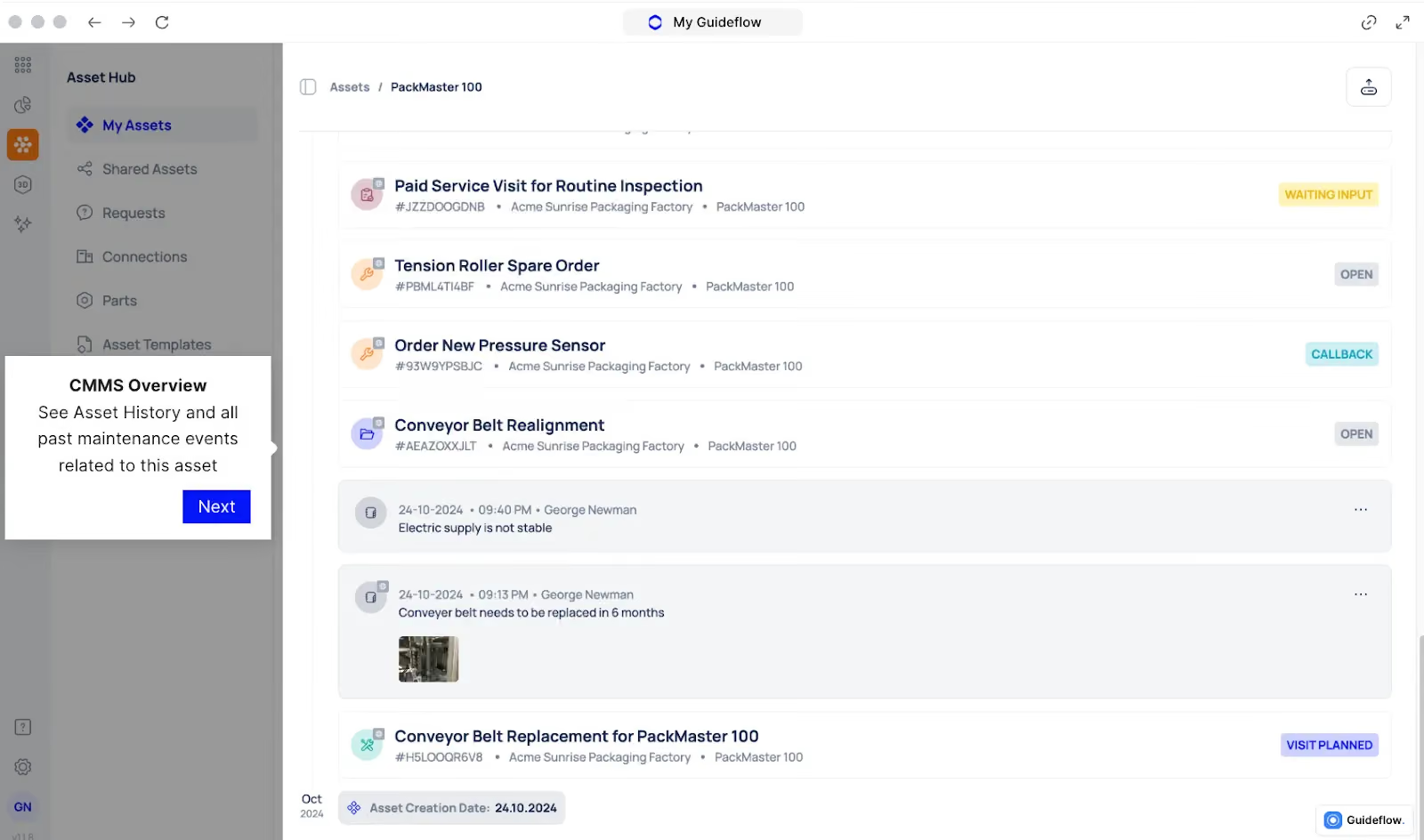
Production downtime tracking is only valuable when your plant has a system that captures events accurately, analyzes patterns, and turns insights into action. That’s where Makula CMMS comes in.
Makula combines maintenance management, conversational AI, and downtime analytics in one platform. This makes it easier for teams to understand why downtime happens and how to prevent it.
Below are Makula’s key features that support downtime tracking and reduction:
Real-Time Asset Status to Spot Downtime Early
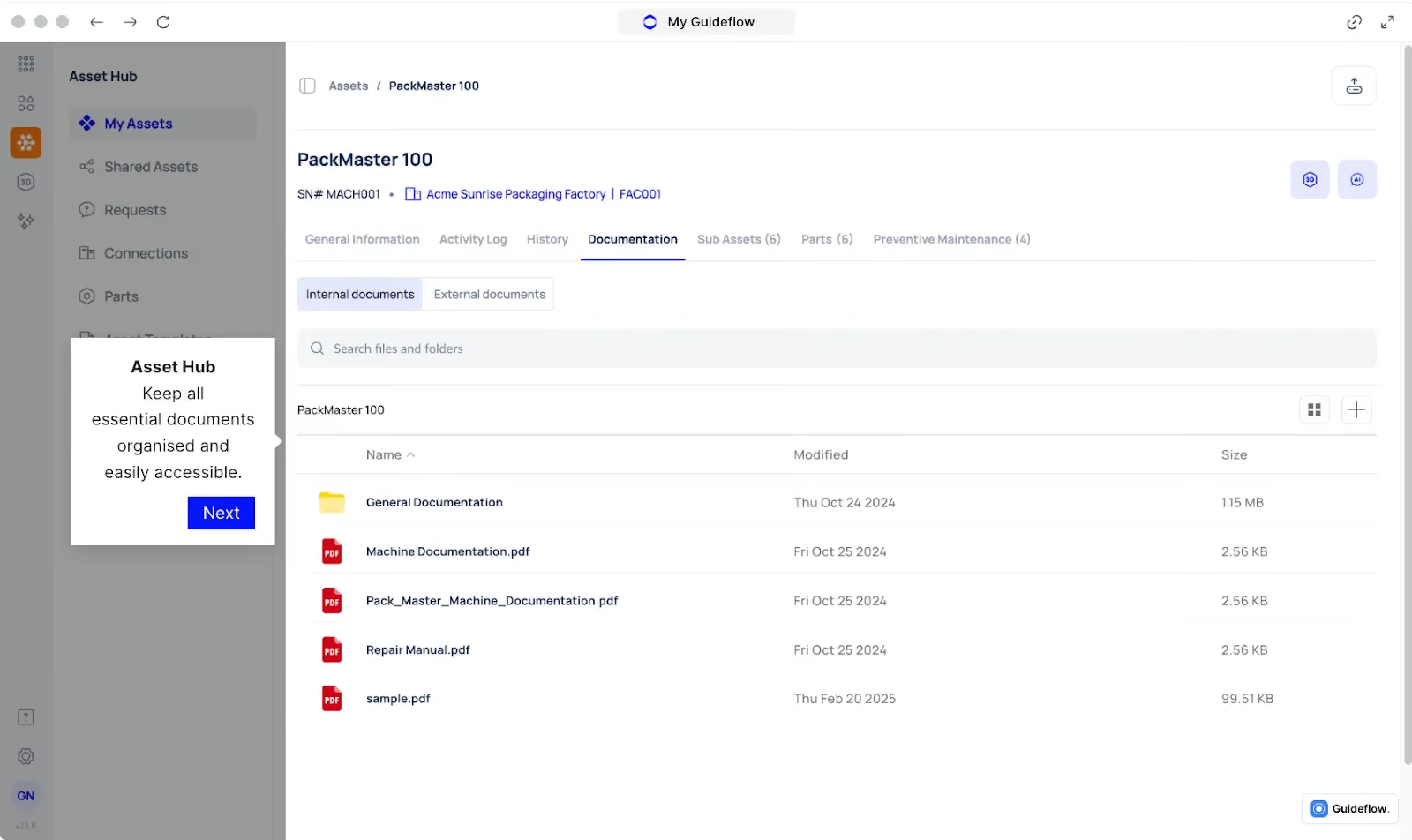
Most plants discover downtime too late. A line stops, operators notice minutes later, and the root cause becomes harder to trace. These delays stretch downtime and reduce output.
Makula fixes this with real-time asset management and visibility. Every machine’s running state, speed, and condition is tracked automatically, so teams know the moment something stops or slips out of normal performance.
Here’s how asset management reduces downtime:
- Instant Stop Detection: Makula logs a downtime event the second a machine stops.
- Live Status: Supervisors see which lines are running or down without walking the floor.
- Early-warning Signals: Temperature spikes, slow cycles, and abnormal patterns appear in real time.
- Accurate Downtime Records: Automatic capture eliminates late or missing entries.
By giving teams a live window into equipment health, Makula shortens response times and reduces both planned and unplanned downtime.
Automated Work Orders For Smart Routing
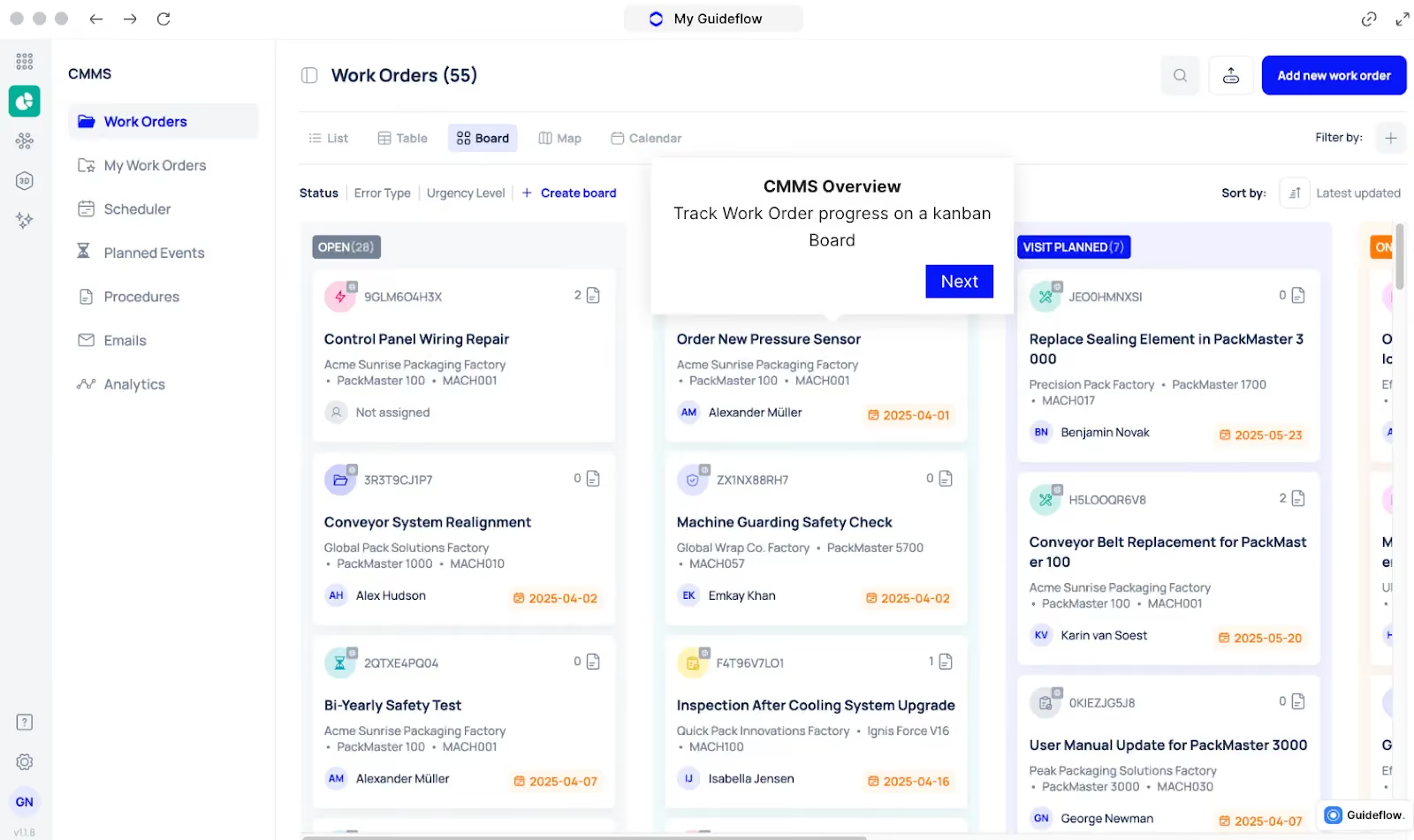
When downtime hits, teams lose minutes just figuring out who to call, what happened, and which technician should respond. Those delays add up, especially when operators have to report issues manually or wait for someone to notice an alert.
Makula streamlines this process with automated work orders. The moment a machine stops or enters a fault state, the system creates a work order, attaches all relevant downtime details, and sends it to the appropriate technician or team.
Here’s how automated work orders keep downtime short:
- Auto-generated Tasks: A work order is created instantly when downtime begins, no operator input needed.
- Smart Routing: Jobs are assigned based on technician skill, location, and priority.
- Pre-filled Context: Fault codes, timestamps, asset history, and recent downtime events are included automatically.
- Real-time Notifications: Technicians receive the job immediately on mobile, reducing response lag.
By turning downtime signals into actionable tasks, Makula helps teams respond faster, avoid confusion, and restore production with minimal delay.
Preventive Maintenance Scheduling to Eliminate Recurring Failures
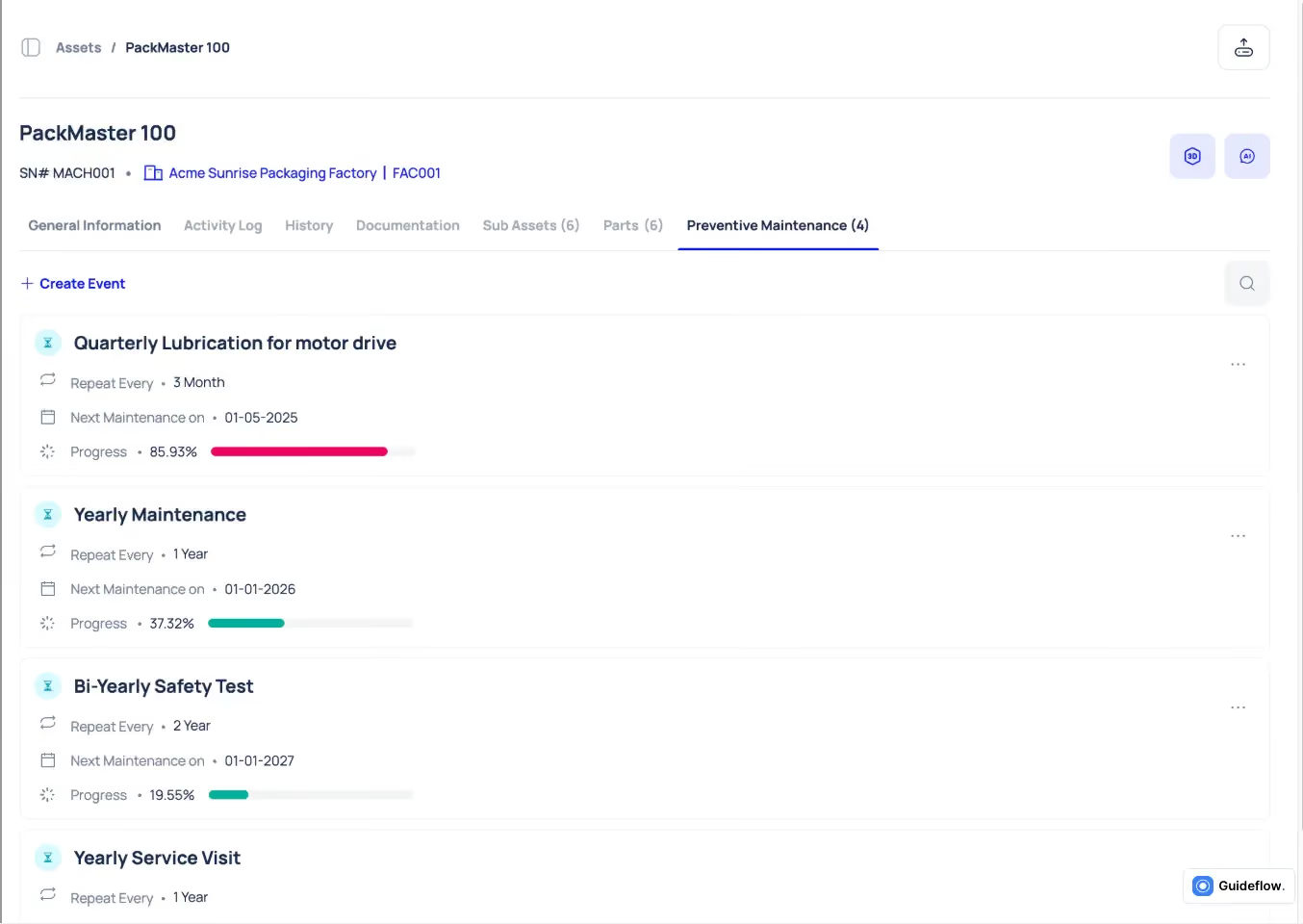
Makula’s preventive maintenance engine turns inconsistent scheduling into a structured, automated workflow. Every maintenance task is linked to asset usage, history, and service intervals, so teams know exactly what needs to be done and when.
With Makula, you can:
- Set recurring maintenance cycles based on runtime, calendar intervals, or condition thresholds
- Attach the correct parts, tools, and procedures to each task so technicians arrive prepared
- Receive alerts before maintenance becomes overdue, preventing avoidable failures
- Track completed PMs with time-stamped records stored under each asset
- Adjust service frequency when repeated faults show a need for tighter intervals
For example, if a conveyor gearbox is due for lubrication every 250 hours, Makula will generate the job automatically, route it to the right technician, and include the exact checklist and parts needed.
Over time, teams can see whether this interval reduces unplanned stops and refine the schedule based on real downtime data.
Downtime Analytics Dashboards for Instant Root-Cause Insights
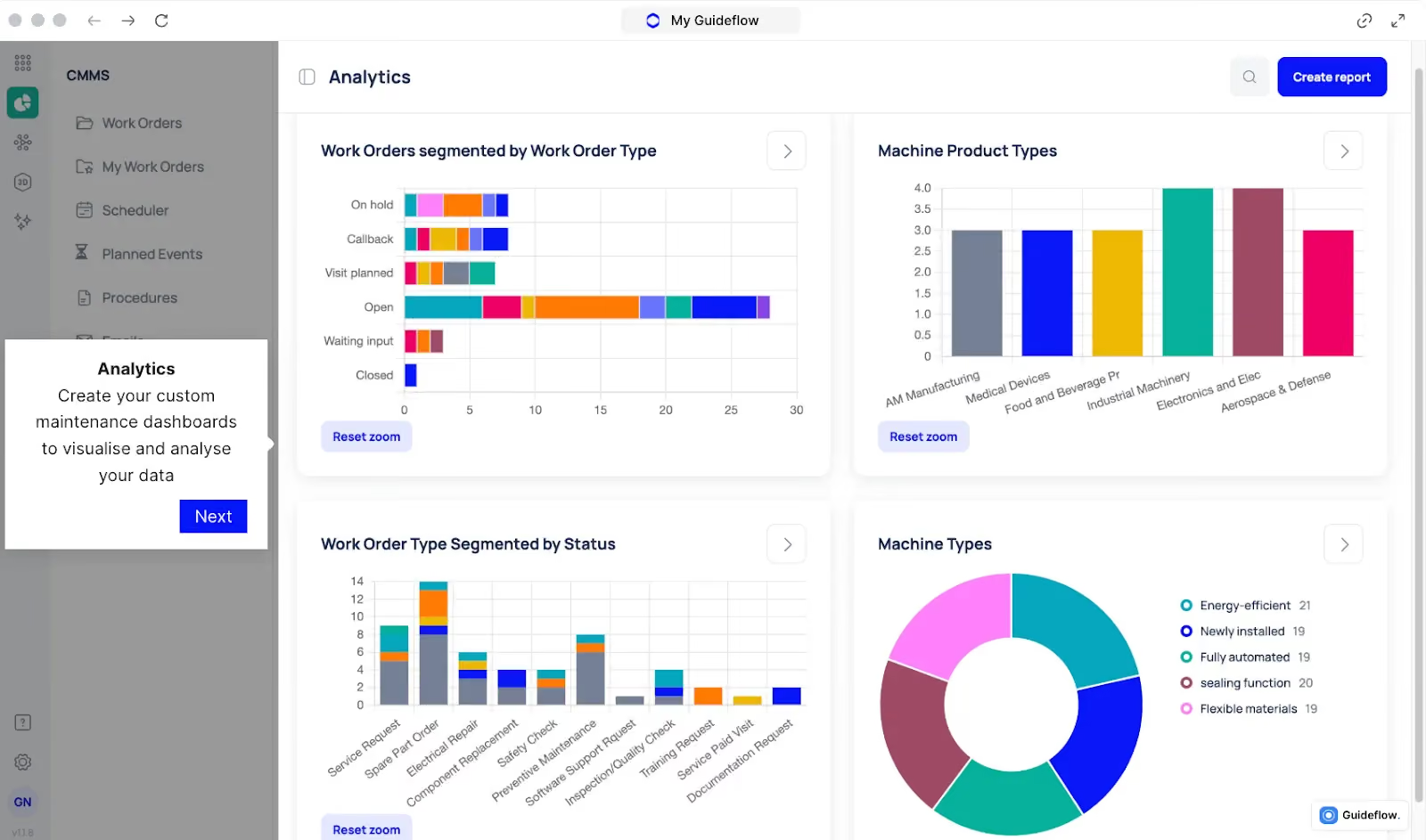
Downtime logs only help when the information is visible, organized, and tied to the events that caused the disruption. Without a unified reporting view, teams spend hours piecing together fault codes, work orders, operator notes, and asset history.
Makula’s downtime analytics dashboards give operations, maintenance, and production leaders a single and comprehensive view of what happened, where it happened, and how much time was lost.
What teams see on the dashboards:
- Downtime by Reason
- Frequency and Duration Trends
- Performance KPIs
- Drill-down views
- Shift and Line Comparisons
For example, a supervisor reviewing weekly downtime can immediately see that Line 4 had repeated sensor faults during the night shift. By opening the linked work orders, it becomes clear that the root cause is a loose mounting bracket.
Parts & Inventory Tracking That Prevents Downtime From Missing Spares
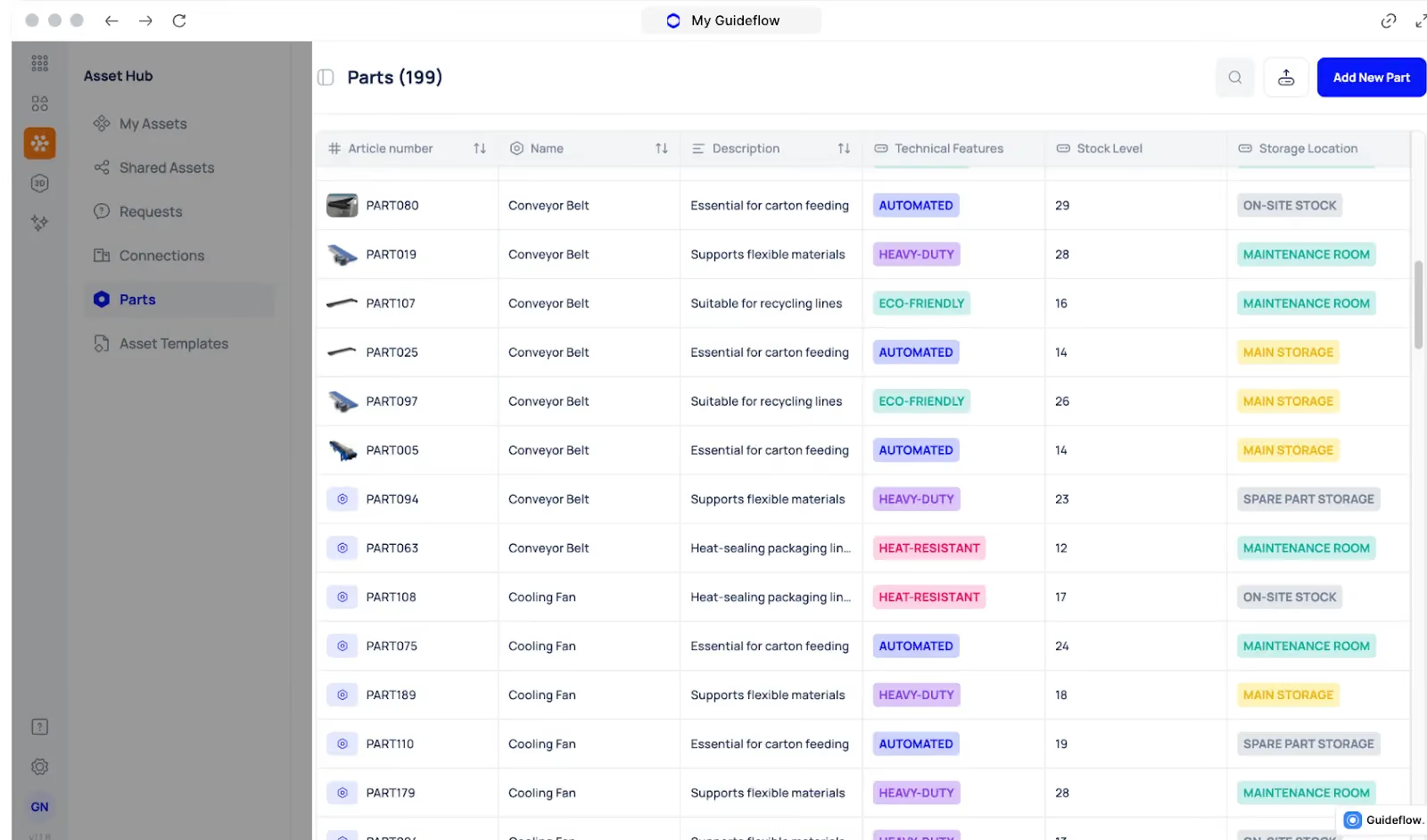
Downtime lasts longer than the repair itself simply because the required part isn’t available. Missing consumables, delayed sourcing, or unclear stock levels can stop an entire line.
Makula’s parts and inventory module gives teams a centralized view of every spare part tied to production equipment. You can view:
- Article number
- Part name
- Available quantity
- Consumed stock
- Inventory cost
Makula also flags low or critical shortages, for example, “5 units will run out soon,” highlighted in red, so teams act before production is affected.
AI Maintenance Copilot for Faster Troubleshooting During Breakdowns
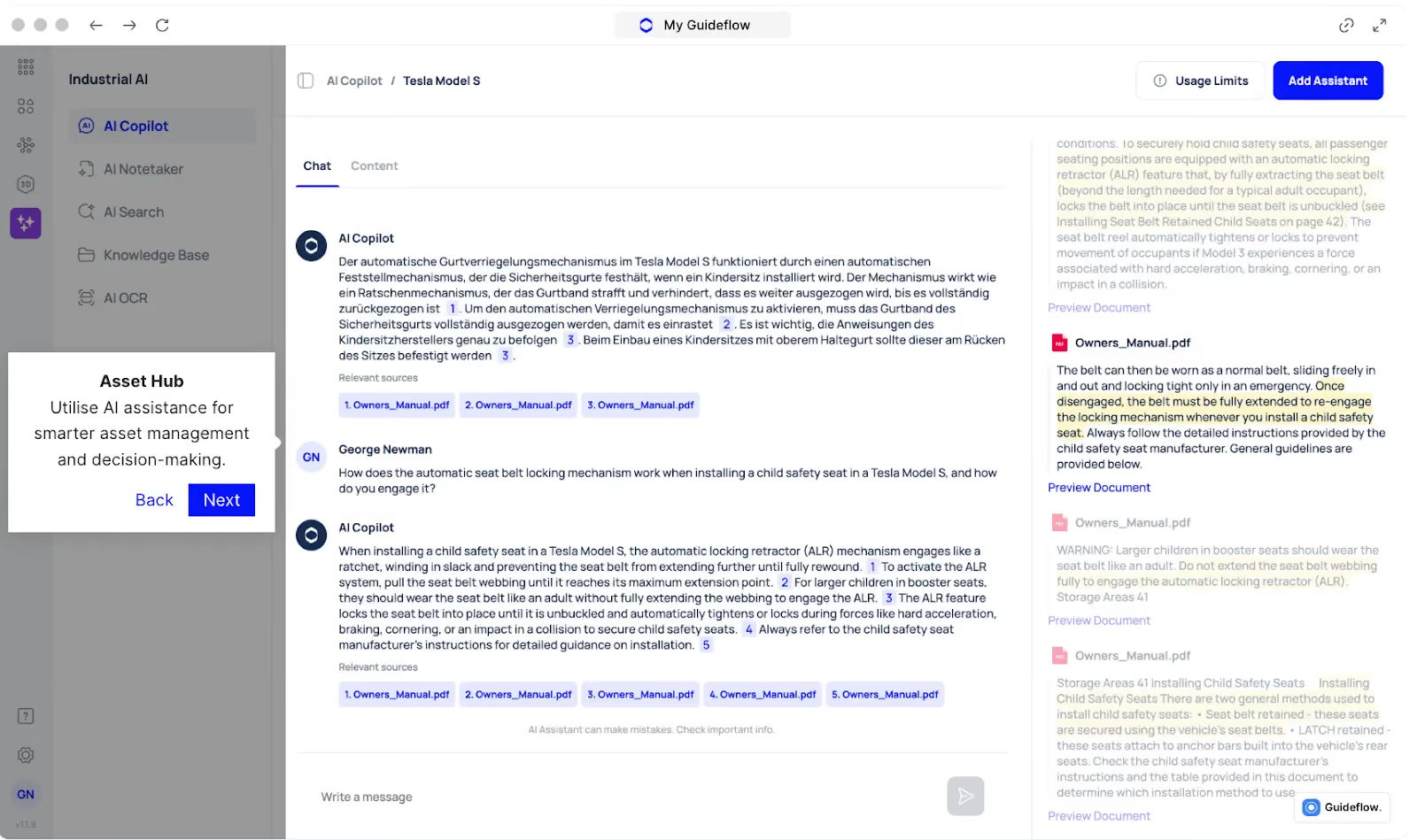
Breakdowns last longer when technicians have to search through manuals or past work orders to understand what happened. Every minute spent looking for information extends downtime.
Makula’s AI Maintenance Copilot gives technicians instant access to the information they need. It pulls from service history, fault patterns, manuals, and previous repairs to provide clear diagnostic steps on the spot.
Technicians have instant access to:
- Likely root causes
- Recommended checks
- Repair instructions for the specific asset
- Similar past faults and resolutions
- Required parts based on asset history
For example, if a conveyor motor shows abnormal vibration, the Copilot highlights common causes for that model, displays a previous bearing-related repair, and shows the correct replacement part. The technician can begin the fix without wasting time searching for information.
How to Build a Downtime Tracking Framework
A downtime tracking framework helps teams capture every stop consistently, analyze the data accurately, and turn insights into action.
Without structure, downtime information becomes scattered or incomplete, making it hard to improve performance. Here’s a practical step-by-step framework any plant can apply:
Create a Standardized Downtime Taxonomy
A downtime taxonomy is the list of categories and reason codes used to classify stoppages. It ensures everyone logs downtime the same way.
Here’s how to structure it:
- Start with broad categories: mechanical, electrical, material, operator, planned, unplanned
- Add specific, actionable reason codes under each category
- Keep the list manageable (ideally 15–25 reasons) so operators don’t feel overwhelmed
- Use symptom-based descriptions (e.g., “sensor misaligned” rather than “quality issue”)
A clean taxonomy prevents vague entries and makes analysis meaningful.
Define Rules for What Counts as Downtime
Teams need clarity on what should be recorded and what shouldn’t.
Common rules include:
- Record any stop longer than X minutes (e.g., 2 or 3 minutes).
- Define small stops separately if needed.
- Identify which planned stops should still be logged (changeovers, sanitation, setups).
- Specify what needs operator confirmation vs. automatic capture.
Defined thresholds prevent inconsistent reporting.
Train Teams on How to Capture Downtime
Operators are closest to the equipment, and their accuracy is essential. Training should cover:
- When to log downtime
- How to choose the correct reason code
- Using HMIs, tablets, or log sheets
- What “good” downtime data looks like
The goal is to remove ambiguity so downtime is logged immediately and accurately.
Capture Real-Time Events
Real-time tracking improves accuracy and response. This can include:
- PLC signals detecting stops
- Machine sensors capturing run/stop states
- Operator tablets or terminals
- Digital dashboards showing live status
This prevents missed events and reduces delays between a stoppage and action.
Review and Analyze Data Weekly
Consistent analysis keeps downtime reduction on track. Your review should include:
- Top 5 downtime reasons (by duration and frequency)
- Trends across shifts or lines
- Repeat failures
- Differences between planned vs. unplanned stops
- Any spikes tied to specific products or materials
Analytical tools like Pareto charts, trend lines, and heatmaps help teams focus on what matters most.
Implement Fixes and Measure Their Impact
Once you identify a root cause, create a corrective action and monitor whether it actually reduces downtime. Actions include:
- Updating maintenance schedules
- Standardizing settings
- Replacing worn components
- Improving changeover procedures
- Enhancing operator training
- Stocking critical spare parts
This turns downtime tracking into a sustainable continuous-improvement process.
Bottom Line: Makula Is the Best Production Downtime Tracking CMMS
Cutting downtime doesn’t start with bigger teams or new machinery. It starts with visibility. When every stop is tracked accurately and every pattern is defined, plants can increase uptime, reduce failures, and keep production running at its full potential.
Makula gives manufacturing teams a complete system to track downtime in real time, analyze trends, prevent recurring failures, and maintain steady throughput across every shift.
Book a demo to see how Makula helps factories cut downtime, boost OEE, and stay production-ready every day.