
Generator maintenance software helps operations teams monitor generator health, prevent unexpected failures, and automate maintenance before breakdowns occur. By combining real-time generator monitoring with remote visibility and preventive maintenance workflows, maintenance teams can reduce downtime, extend equipment life, and stay compliant across critical power assets.
Whether you manage standby generators, industrial power units, or distributed generator fleets, the right system connects monitoring data directly to maintenance actions—turning alerts into scheduled work, not emergencies.
Key Takeaways:
- Real-time generator monitoring with actionable alerts
- Remote generator monitoring across multiple sites
- Automated preventive maintenance scheduling based on run hours and events
- Centralised maintenance history, inspections, and compliance tracking
Why generator maintenance is different
Generators sit and wait, then must perform reliably. That creates three challenges:
- Usage-based wear — lifetime consumption is better measured by run-hours and starts, not calendar days.
- Fuel & battery degradation — fuel can stratify or degrade when sitting; batteries self-discharge.
- Intermittent testing — load-bank tests and transfer tests are critical, and they should generate data that drives PMs.
Because of this, generator preventive maintenance software must combine telemetry and flexible triggers. For the power generation industry, a one-size-fits-all PM calendar is inadequate; you need software for the power generator maintenance industry that understands run-hours and event-driven scheduling.
Generator monitoring system: what it measures and why it matters
A generator monitoring system typically collects:
- Run-hours and start counters
- Oil temperature & pressure, coolant temps
- Battery voltage & charging status
- Fuel level and fuel tank alarms
- Event logs and fault codes
- Transfer switch status and ATS events
How it ties to a CMMS: monitoring systems are the signal layer. The CMMS is the action layer — it takes a telemetry alert (e.g., battery voltage low), creates a prioritised work order, assigns a technician, and records the repair for future analysis.
Typical telemetry → workflow
- Telemetry: Battery voltage < threshold → CMMS action: create urgent inspection work order + assign to on-call tech.
- Telemetry: Run-hours exceeded threshold → CMMS action: generate PM for oil change, parts picklist, and schedule field visit.
Remote generator monitoring: workflows & best practices
Remote generator monitoring means technicians and managers can see a generator’s health without being on-site. Best practices:
- Alert routing: Critical alarms route to mobile app push / SMS; informational alerts go to dashboards.
- Automated triggers: Define thresholds that create work orders automatically to reduce missed issues.
- Event correlation: Combine alarms with run-hours and recent jobs to reduce false positives.
- Data retention & trending: Keep ≥12 months of telemetry to detect slow degradation (e.g., battery decline).
“Remote monitoring reduced firefighter maintenance events in our fleet by enabling preventative action before an emergency starts.” — Reliability manager
Automatic preventive maintenance scheduling for generators
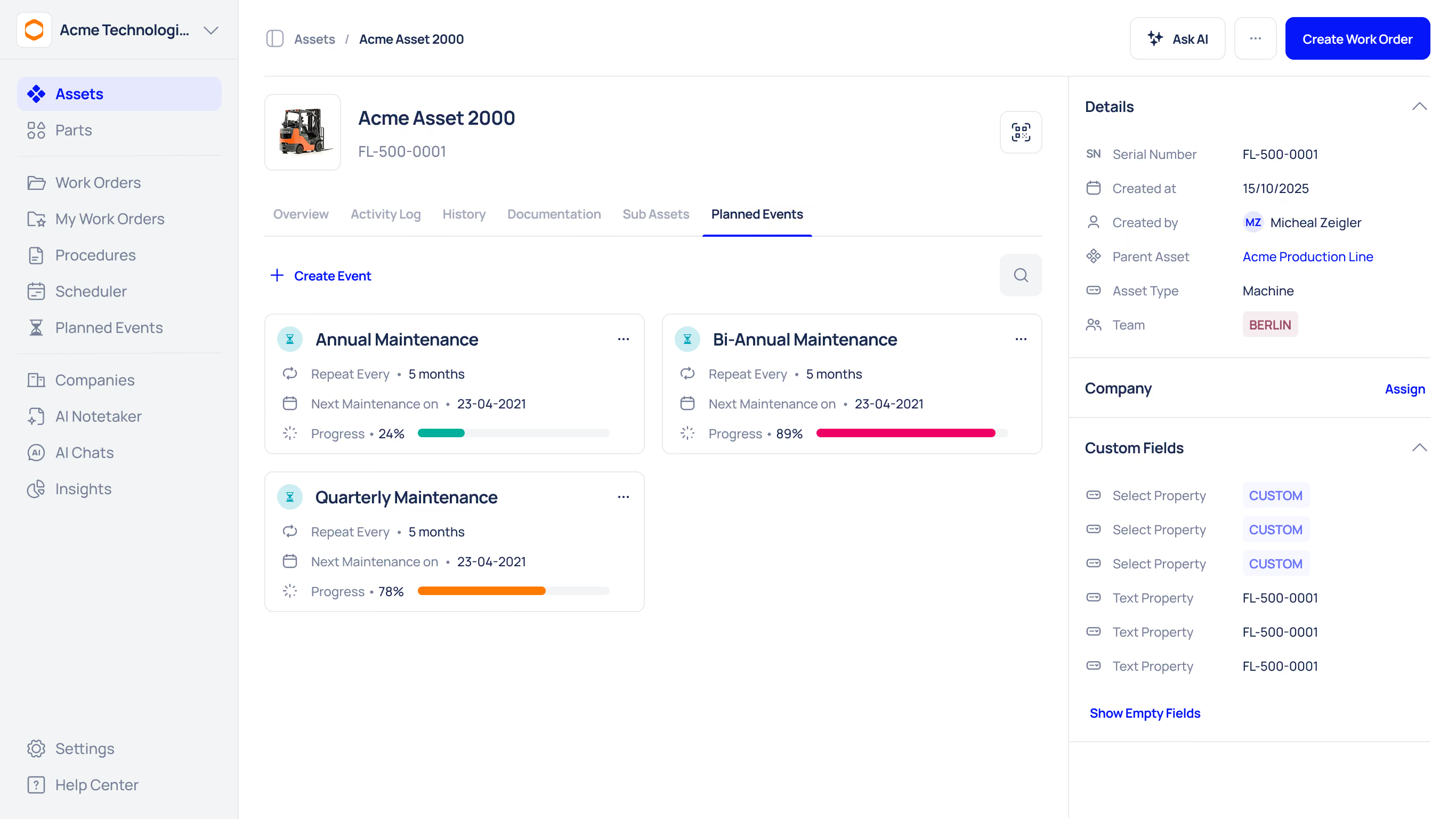
Automatic scheduling should be flexible:
- Run-hours triggers: e.g., oil change every 500 run-hours.
- Starts-count triggers: e.g., inspection every 100 starts.
- Calendar fallback: if run-hours data is missing, fall back to calendar intervals.
- Event-based PMs: e.g., after a failed start event, schedule diagnostic + load-bank test.
Example PM schedule (simple):
- Daily: Visual inspection, fuel level check.
- Weekly: Battery voltage check, start test.
- Monthly: Load-test log, oil level.
- Every 500 run-hours: Oil change, filter change, full inspection.
On-the-ground workflow (example)
- Telemetry indicates low battery voltage.
- CMMS auto-creates an Urgent work order with photos required.
- On-call tech receives push notification, accepts task, and uses an offline mobile form if no connectivity.
- Work completed; parts used logged; record automatically updates asset health KPI.
Implementing generator maintenance software: checklist & KPIs
- Build an asset register (tag each genset, engine model, control panel).
- Map telemetry points for each generator (run-hours, battery, fuel).
- Configure run-hour and event triggers in CMMS.
- Pilot with 1-3 gensets for 30–60 days.
- Train techs on mobile forms & offline usage.
- Iterate rules to reduce false alarms.
KPIs to measure
- Emergency start rate (events per 1,000 starts).
- Mean time to repair (MTTR) for generator faults.
- Percentage of PMs completed on time.
- Spare parts stockout rate.
Security, compliance & data ownership
Why this matters: Generator telemetry may include critical infrastructure signals. Understand where telemetry is stored, who has access, and whether the provider adheres to local data residency or industry regulations (e.g., healthcare, utilities).
Checklist:
- Encryption at rest + in transit (TLS + AES)
- Role-based access and audit logs for technicians and admins
- Data retention policy and export capability (for compliance or audits)
- SLA for alert delivery & uptime of the remote monitoring system
Quick note: if your facility is regulated, include compliance stakeholders (security, legal) in procurement.
Integrations & data flow: telemetry → CMMS → dashboards
- MQTT / HTTP webhook: monitoring system pushes events to CMMS.
- CSV / API bulk import: telemetry batches are imported daily for older systems.
- SCADA ↔ monitoring ↔ CMMS: In larger plants, telemetry may flow via SCADA to a historian, then into CMMS.
Integration checklist
- Map telemetry event types to CMMS work order priorities.
- Ensure timestamps, run-hours, and device IDs match asset tags in CMMS.
- Test end-to-end: alarm → WO generated → tech receives task → completes & syncs.
Cost & licensing models to expect
- Per asset (generator) per month — common for small fleets.
- Per user or per technician (mobile access) — watch for hidden seat costs.
- Tiered for features (basic monitoring ingestion vs advanced analytics/alerts).
- Implementation/connector fees for telemetry/SCADA integration.
TCO considerations
Include implementation, training, mobile device costs, and recurring telemetry/telemetry-gateway charges when modelling ROI.
Vendor evaluation checklist
Use this checklist when demoing vendors:
Common pitfalls & troubleshooting
- Pitfall: Over-sensitive alarms → alarm fatigue. Fix: tune thresholds and implement alert tiers.
- Pitfall: Telemetry mismatch (IDs not matched to assets) → False positives. Fix: standardise asset tags and test mapping.
- Pitfall: No offline capability → missed PM closeouts. Fix: ensure mobile apps support offline save + later sync.





